
RoomDiY
Key Features
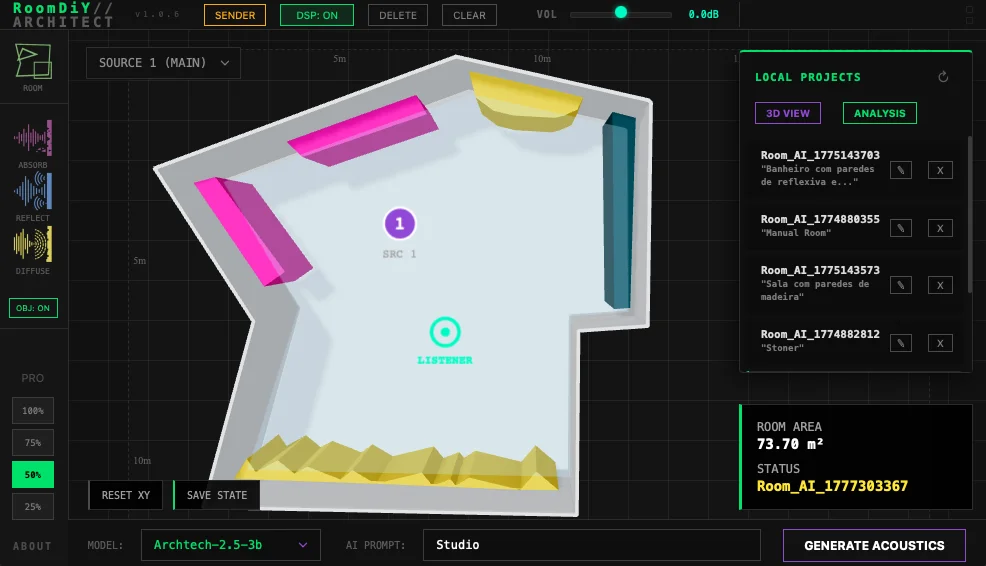
- Draw custom room layouts in a 2D editor and shape the space with dimensions, materials, and acoustic properties
- Place absorbers, reflectors, and diffusers so treatment choices feed directly into the modeled room response
- Position up to eight independent audio sources plus a listener point for multi-track depth and distance decisions
- Generate local AI acoustic reports with RT60, room-mode, frequency-response, and treatment-placement insights
- Switch to a 3D visualizer to inspect the designed room from a more spatial perspective
- Use Sender / DSP Bypass routing to share one room across multiple tracks without repeating the full processing load
Description
RoomDiY is an acoustic room simulation plugin from Audio Fusion Bureau that lets you build a virtual space inside a DAW and hear how source position, listener position, surface materials, and treatment objects affect the result. Instead of loading fixed impulse responses, it generates room behavior from the geometry and acoustic choices you define.
The workflow is aimed at producers who want more control than a normal room reverb provides. You can draw a custom 2D room, place absorbers, reflectors, and diffusers, position up to eight sources around a listener, and switch into a 3D view to inspect the space.
RoomDiY also doubles as a room analysis tool. Its offline AI engine can calculate RT60, room modes, frequency response behavior, and written acoustic reports, which makes it useful for testing studio ideas as well as creating believable or exaggerated spaces for mixes.
As checked on April 30, 2026, the official RoomDiY page has a 'Get RoomDiY Free' section with direct macOS and Windows download buttons, while a separate paid Pro license removes the free version's room-count and 100 m2 room-size limits. The Windows installer is about 1.8 GB.
Video Preview

Frequently Asked Questions
How is RoomDiY different from a normal reverb plugin?
RoomDiY builds the room from geometry, source placement, listener placement, surface materials, and treatment objects. That makes it closer to an acoustic design and room simulation tool than a preset-based algorithmic or convolution reverb.
What limits are in the RoomDiY free version?
Audio Fusion Bureau says the free version has a limited number of rooms that can be created and supports rooms up to 100 m2. The paid Pro license is offered separately for users who want to remove those restrictions.
Does RoomDiY need an internet connection for its AI analysis?
The official page and KVR listing describe the AI acoustic engine as local and offline. The tradeoff is that the calculations are CPU intensive, and Windows users need an AVX-capable processor.


