
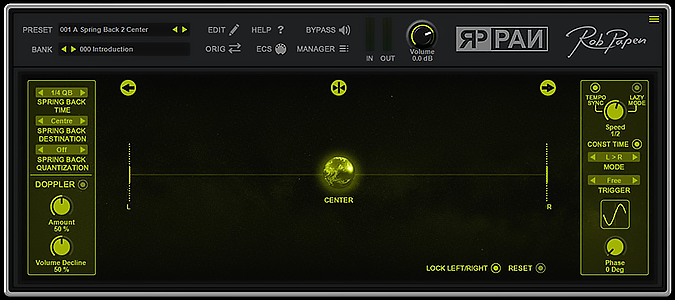
RP-PAN
Key Features
- Panning Sphere with manual recording of pan movements and position selectors for left, center, and right
- Tempo-synced Spring Back that reverts panning to a chosen position with speed settings from instant to one bar
- Spring Back quantization from 2 to 32 steps for rhythmic, beat-locked panning patterns
- Doppler FX with dedicated amount and volume decline controls for pitch-shifting depth simulation
- Lazy Mode with 12 movement patterns, speed from 0.3 Hz to 27.50 Hz, tempo sync, and phase control up to 360 degrees
- Resizable GUI at 100%, 150%, and 200% with bank manager, preset search, and external MIDI control
Description
RP-PAN is a creative panning effects plugin from Rob Papen, released to celebrate the brand's 25th anniversary. Built around a central Panning Sphere, it lets you manually record pan movements between left and right in the stereo field or load from a curated bank of presets.
The standout feature is the tempo-synced Spring Back system. It automatically reverts the Panning Sphere to the center, left, or right position with adjustable speed settings ranging from instant snap to gradual returns up to one bar in length.
Spring Back also includes quantization controls from 2 to 32 steps, opening up rhythmic panning patterns that lock tightly to your project tempo. Combined with the adjustable left/right panning amounts (0 to 100% per side), it provides precise control over how wide or narrow the movement travels.
The Doppler FX section adds pitch-shifting depth simulation with dedicated amount and volume decline controls. For hands-off automation, Lazy Mode offers speed control from 0.3 Hz up to 27.50 Hz with tempo-sync options and 12 distinct movement patterns including saw waves, center-to-edge sweeps, and bidirectional cycles.
A phase control (0 to 360 degrees) on the Lazy Mode LFO lets you offset the modulation for stereo layering across multiple instances. The plugin ships with a bank manager, preset browser with search, resizable GUI at 100%, 150%, and 200%, and external MIDI control support.
Video Preview

Frequently Asked Questions
What is the Spring Back feature in RP-PAN?
Spring Back is a tempo-synced function that automatically returns the Panning Sphere to a chosen position (center, left, or right) after you move it. You can set the return speed from instant to one bar and adjust the quantization from 2 to 32 steps, creating rhythmic panning patterns that sync to your project tempo.
What is the difference between Lazy Mode and manual panning in RP-PAN?
Manual panning lets you physically drag the Panning Sphere to record custom movements in real time. Lazy Mode is an automated alternative that generates continuous panning movement using 12 predefined patterns (such as left-to-right sweeps or saw waves), with speed and tempo-sync controls so you can set it and leave it running.
Does RP-PAN support Doppler effects?
Yes. The Doppler FX section uses the Panning Sphere position to apply pitch-shifting that simulates the sound of a source moving toward or away from the listener. It has separate amount and volume decline controls so you can dial in subtle or dramatic movement effects.
Can I control RP-PAN with an external MIDI controller?
Yes. RP-PAN includes an External MIDI Control (ESC) capture mode that lets you assign MIDI CC messages from a hardware controller to the plugin's parameters. You can also select presets and banks via MIDI for hands-free switching during a performance.


