
Rust
Key Features
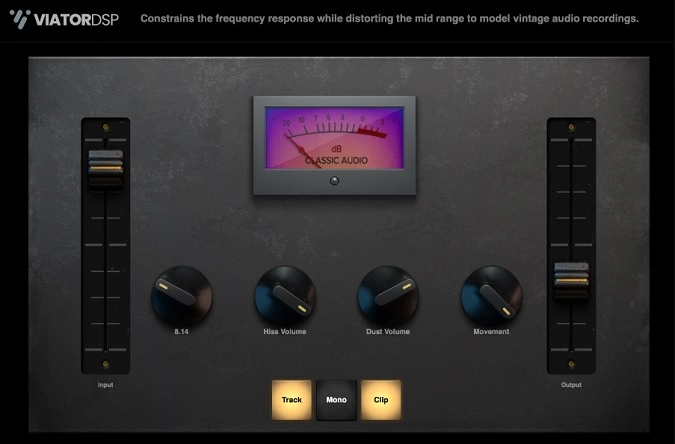
- Synthesized vinyl dust, hiss, crackle, and pop noise that layers onto any audio signal
- Age parameter for mid-range distortion that simulates decades of vinyl wear, from subtle warmth to heavy grit
- Low and high-frequency cutoff controls that emulate the limited bandwidth of cassettes and vinyl records
- Movement knob for wow-and-flutter pitch modulation with tape-style flanging and chorusing artifacts
- Slim, focused interface that prioritizes fast, intuitive workflow over menu diving
- Compatible with VST3 and AU hosts on both Windows (64-bit) and macOS (Intel and Apple Silicon via Universal binary)
Description
Rust by ViatorDSP is a lo-fi effect plugin that synthesizes vinyl dust, hiss, crackle, and wow-and-flutter to give any audio source the worn character of a vintage record. It runs on Windows and macOS in VST3 and AU formats.
The control set is deliberately minimal. Low and high-frequency cutoffs narrow the bandwidth to emulate the limited response of cassettes and vinyl, while a dedicated noise section layers synthesized dust and hiss onto the signal.
The standout feature is the Age parameter, which distorts the mid-range to simulate years of wear on a vinyl pressing. At low settings it adds subtle warmth; pushed further it introduces audible grit and harmonic distortion.
A Movement control adds wow and flutter, introducing tape-style pitch modulation that works especially well on keys, pads, and melodic material. Combined with the frequency cutoffs and noise, it can take a clean digital recording deep into worn-media territory.
Rust is open-source and available as pay-what-you-want from ViatorDSP's Gumroad page, with the full C++ source code published on GitHub.
Video Preview

Tips
- Use the age parameter to add a subtle or intense vintage character to your audio.
- Experiment with the low and high-frequency cutoffs to emulate the limited frequency response of vintage media.
- Add synthesized dust and hiss to your tracks to create an authentic vinyl atmosphere.
- Apply Rust on a drum bus to achieve a gritty, lo-fi sound.
- Utilize the plugin on melodic instruments to add wow and flutter effects for a nostalgic feel.
- Combine Rust with other effects to create unique sound textures and layers.
Frequently Asked Questions
Does Rust work on Apple Silicon Macs?
Yes. Rust ships as a Universal binary that runs natively on both Intel and Apple Silicon (M1/M2/M3) Macs without Rosetta. It supports macOS High Sierra (10.13) and later.
What is the Age parameter in Rust?
The Age parameter distorts the mid-range frequencies to simulate years of wear on a vinyl record. At low values it adds gentle warmth and slight harmonic coloring. Turning it up introduces progressively more grit and mid-range saturation for a heavily degraded vintage sound.
Can Rust be used in Pro Tools?
Rust is available in VST3 and AU formats only; it does not include native AAX support. To use it in Pro Tools you would need a third-party wrapper like Blue Cat PatchWork to host the VST3 version inside an AAX shell.
What is the difference between the Age and Movement controls?
Age adds harmonic distortion and mid-range saturation to simulate vinyl degradation, while Movement introduces wow-and-flutter pitch modulation similar to a worn tape transport. Age affects the tonal character; Movement affects pitch stability. They work well combined but serve different purposes.


