SA60

Key Features
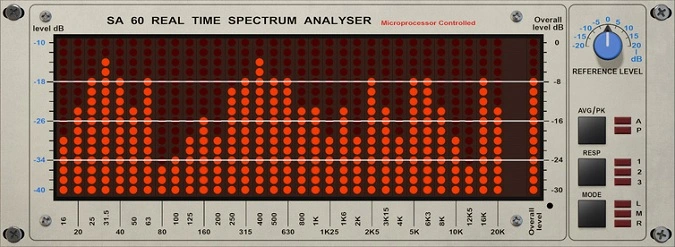
- Real-time 1/3 octave spectrum analysis from 16 Hz to 20 kHz with classic LED-bar display modeled on the Klark-Teknik DN60
- Switchable average and peak reading modes with three selectable response speeds (fast, medium, slow)
- Supports 44 channel configurations from stereo through 7.1.4 and 9.1.6 immersive audio formats
- Adjustable reference level and overall level calibration with 1 dB or 2 dB resolution options
- Resizable and draggable plugin window with selectable rendering engine (D3D, OpenGL, or CPU on Windows)
- SIMD optimization controls and undo/redo for all parameter changes
- Designed to pair with the EQ302 graphic equalizer, sharing center frequencies for direct analyzer-to-EQ workflow
Description
The SA60 by Red Rock Sound is a real-time 1/3 octave spectrum analyzer modeled after the legendary Klark-Teknik DN60, a hardware unit that has been a studio staple since 1980. It displays frequency bands from 16 Hz to 20 kHz with bright red LED-style bars, giving you an instant visual snapshot of your mix's spectral balance.
The analyzer supports both average and peak reading modes, letting you toggle between sustained level monitoring and transient detection. Three selectable response speeds (fast, medium, slow) let you fine-tune the display behavior for different mixing tasks.
Beyond basic stereo analysis, the SA60 handles up to 44 channel configurations including 7.1.4 and 9.1.6 immersive formats, plus custom 16-channel profiles. This makes it one of the few spectrum analyzers capable of monitoring Dolby Atmos and other spatial audio workflows.
The interface includes overall level calibration, reference level control, and selectable resolution modes at 1 dB or 2 dB steps. A rendering engine selector on Windows lets you choose between Direct3D, OpenGL, or CPU-based display, with SIMD optimization for smooth performance.
Users in mixing forums report that the SA60 is particularly useful for cross-referencing tracks during mixing and quickly targeting frequency imbalances. The companion EQ302 graphic equalizer shares matching center frequencies, so analyzer readings transfer directly to the equalizer for fast corrective adjustments.
Video Preview

Tips
- Use the SA60 to find and correct frequency imbalances in your mix.
- Compare your track with commercial reference tracks to ensure a balanced frequency spectrum.
- Adjust the reference level to match the analyzer's sensitivity to your mix's overall loudness.
- Switch between average and peak readings to get a full view of your audio signal's dynamics.
- Try different response times to find the setting that best suits your workflow.
- Use the display modes to analyze specific channels (left, mid, right) for more detailed frequency analysis.
- Combine the SA60 with an EQ plugin to quickly identify and address problematic frequencies.
- Regularly check the spectrum analyzer during the mixing process to ensure a well-balanced mix.
Frequently Asked Questions
Does the SA60 support immersive and surround sound formats?
Yes. The SA60 supports 44 common channel configurations from stereo all the way up to 7.1.4 and 9.1.6 immersive formats, plus custom 16-channel profiles. This makes it suitable for Dolby Atmos and other spatial audio mixing workflows.
How does the SA60 differ from a full-range FFT spectrum analyzer?
The SA60 uses 1/3 octave band analysis rather than continuous FFT, which groups frequencies into standardized bands that correspond to how humans perceive pitch. This makes it faster to read for broad tonal balance checks, though it provides less granular detail than an FFT analyzer for surgical frequency work.
Can the SA60 be used alongside Red Rock Sound's EQ302?
Yes, and this is by design. The EQ302 graphic equalizer's center frequencies match the SA60's analysis bands exactly, so you can read frequency imbalances on the analyzer and apply corrections on the EQ without any frequency conversion. Both plugins are available for the same formats and platforms.
What rendering engine options are available on Windows?
On Windows, you can choose between Direct3D, OpenGL, or CPU-based rendering via the bottom settings panel. This is useful if you experience display issues with certain GPU drivers. The plugin also includes SIMD optimization controls for performance tuning.