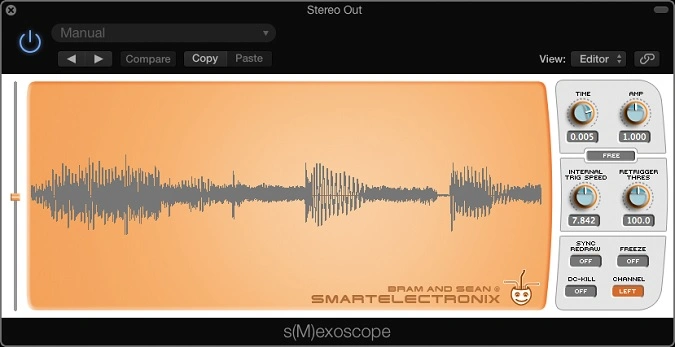
s(M)exoscope
Key Features
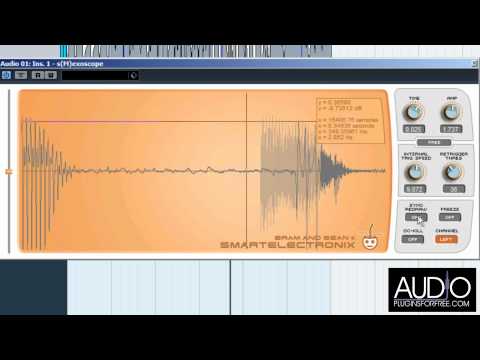
- Real-time waveform display with adjustable Time (pixels per sample) and Amp controls for zooming into individual cycles or viewing full waveforms
- Four retrigger modes — Free, Internal, Rising, and Falling — with adjustable threshold for locking the display to repeating waveform shapes
- Built-in waveform analysis tool that measures selection amplitude (linear and dB), length (samples, seconds, milliseconds), and frequency
- Freeze mode captures a single waveform frame for detailed inspection without the display continuously updating
- DC-Kill option removes DC offset from the display for more accurate waveform representation
- Modular version available with External retrigger mode, optimized for hosts like Plogue Bidule and AudioMulch
- Open-source codebase with modern 64-bit builds for Windows and macOS, including native Apple Silicon support via the JUCE port
Description
s(M)exoscope is a real-time oscilloscope plugin developed by Bram de Jong at Smartelectronix and released as open source in 2003. It renders audio waveforms directly inside your DAW, giving you an instant visual window into what your signal is actually doing.
The plugin includes adjustable Time and Amp controls that let you zoom into individual samples or pull back for a broader waveform overview. Multiple retrigger modes (Free, Internal, Rising, and Falling) lock the display to repeating waveform cycles, making it easy to get a stable view of kicks, basses, and oscillator shapes.
A built-in analysis tool calculates selection amplitude in both linear and decibel values, selection length in samples, seconds, and milliseconds, plus frequency estimation based on a single-cycle selection. Options like Freeze, DC-Kill, and Sync Redraw round out the feature set for precise waveform inspection.
Originally a 32-bit VST, the plugin was ported to 64-bit by Armando Montanez using JUCE, and later modernized again by Matthijs Hollemans with Apple Silicon support. It remains one of the most recommended oscilloscope plugins in the production community, frequently cited as the go-to tool for sidechain visualization, sound design work, and plugin development debugging.
Available as a standard insert effect or a special Modular version optimized for modular VST hosts like Plogue Bidule and AudioMulch.
Video Preview
Tips
- Use the retrigger modes to get a stable view of repetitive waveforms, which is particularly useful for analyzing drum hits and bass lines.
- Adjust the Time and Amp display controls to zoom in on specific parts of the waveform for detailed analysis.
- Utilize the Freeze option to capture and study a specific moment in the audio signal.
- Apply the DC-Kill option to remove any DC offset from the waveform, ensuring a more accurate representation.
- Place markers on the waveform to measure the amplitude, length, and frequency of specific sections, aiding in precise audio adjustments.
- Sync Redraw can be used to control the refresh rate of the display, which is helpful for real-time monitoring during live performances or recording sessions.
Frequently Asked Questions
What is the difference between the Standard and Modular versions?
The Standard version works as a regular insert effect in any DAW. The Modular version adds an External retrigger mode and is optimized for modular VST hosts like Plogue Bidule and AudioMulch, where you can route a trigger signal from another module.
Does s(M)exoscope work on Apple Silicon Macs?
Yes. Matthijs Hollemans rebuilt the plugin with JUCE 8 and released native Apple Silicon builds as VST3 and AU. These are available on the hollance/sMexoscope GitHub repository.
Can s(M)exoscope measure the frequency of a waveform?
Yes. The built-in analysis tool lets you place markers on the waveform and calculates the frequency assuming the selection spans one complete cycle. It also reports amplitude in linear and dB values, plus length in samples, seconds, and milliseconds.
Why does the waveform display keep scrolling instead of showing a stable shape?
Switch from Free mode to one of the retrigger modes (Internal, Rising, or Falling) and adjust the threshold. This locks the display to the rising or falling edge of repeating cycles, giving you a stable waveform view for drums, basses, and oscillators.