SPAN
Key Features
- Configurable FFT block size, window overlap, and visual slope for precise spectrum readouts tailored to your analysis needs
- Simultaneous dual-channel display showing two different channels or channel groups at once for quick stereo or mid/side comparison
- Comprehensive loudness metering with EBU R128 LUFS/LU, K-system calibration, RMS levels, and true peak clipping detection
- Stereo correlation meter that monitors phase coherence and flags potential mono-compatibility issues in real time
- Multi-channel surround support up to 7.1, making it suitable for film, broadcast, and immersive audio projects
- Secondary spectrum overlay displaying real-time maximum, all-time maximum, or average values for identifying frequency buildup over time
- Resizable interface with customizable color schemes, preset management, and undo/redo history for a personalized workflow
Description
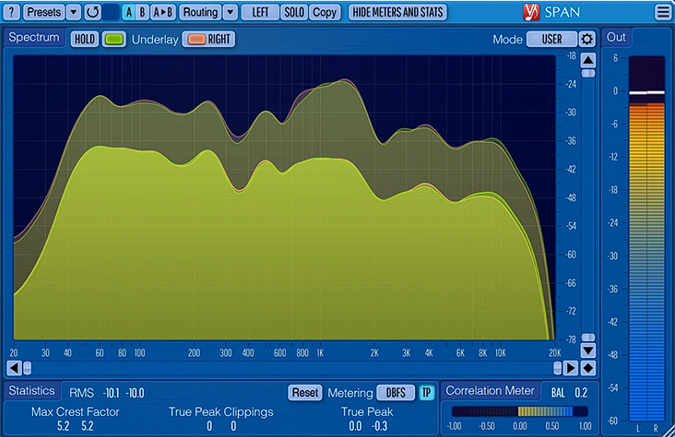
SPAN by Voxengo is a real-time FFT audio spectrum analyzer built for professional mixing and mastering workflows. It displays frequency content with adjustable Fourier block size, overlap percentage, and visual slope, giving you full control over how detailed and responsive the readout appears.
Beyond basic spectrum display, SPAN includes stereo, mid/side, and surround sound analysis up to 7.1 channels. You can view two different channel groups simultaneously, making it straightforward to compare left/right or mid/side balance at a glance.
The plugin bundles a full suite of metering tools alongside the analyzer. Output level metering with adjustable ballistics, EBU R128 LUFS/LU loudness metering, and K-system metering with calibration are all included, along with true peak detection and headroom estimation.
A correlation meter tracks stereo phase coherence in real time, flagging potential mono-compatibility issues before they become problems. The secondary spectrum display can show real-time maximum, all-time maximum, or average readings, which is particularly useful for identifying resonant peaks during a full mix pass.
SPAN runs as a 64-bit plugin on both macOS and Windows, supporting VST, VST3, AudioUnit, and AAX formats. It works with every major DAW including Ableton Live, Logic Pro, Pro Tools, FL Studio, Cubase, REAPER, and Studio One.
Video Preview


Frequently Asked Questions
What is the difference between SPAN and SPAN Plus?
SPAN Plus adds multi-track spectrum comparison in a single window, PNG export, and real-time spectrum import/export. The standard SPAN covers single-instance analysis, correlation metering, and EBU R128 loudness metering, which is sufficient for most mixing and mastering needs.
How should I set up SPAN for mixing?
A common starting configuration is to set the block size to 4096 samples for a good balance of frequency detail and responsiveness, with an average time of around 1400ms. Switching the routing to mid/side stereo lets you monitor both the center image and stereo width simultaneously using the correlation meter.
Can SPAN analyze surround sound mixes?
Yes. SPAN supports multi-channel analysis including 5.1 and 7.1 surround configurations. You can group channels and display spectrums from two different channel groups at the same time, which is useful for broadcast and film post-production work.
Does SPAN use significant CPU resources?
SPAN is lightweight and designed to run continuously on your master bus without noticeable CPU impact. Users consistently report rock-solid stability across FL Studio, Ableton Live, Logic Pro, and other DAWs even when leaving it open on every project session.