
SUBSPACE
Key Features
- Uses Zynaptiq’s allpass reverb technology to create a dense, expansive spatial effect.
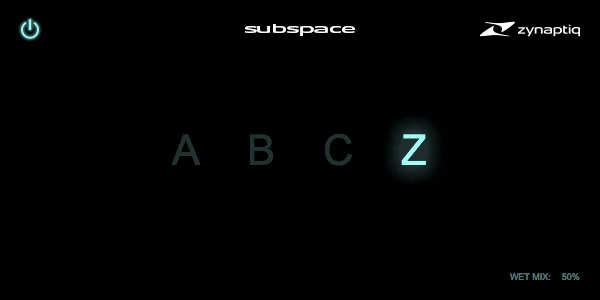
- Four preset characters—A, B, C, and Z—make it quick to choose a starting sound.
- A single Dry/Wet control keeps blending the effect with the source straightforward.
- The intentionally minimal interface suits fast writing, sound-design, and mixing decisions.
- Version 1.2.1 adds native Apple Silicon support for AU, VST 2, VST 3, and AAX Native.
- The macOS installer lets you choose the plugin formats to install.
- Activation can live on the computer or an optional iLok 2 or 3 USB key.
Description
SUBSPACE is a streamlined algorithmic reverb from Zynaptiq for adding a broad, lush sense of space without building a patch from dozens of parameters. Its allpass reverb engine comes from the company’s MORPH, WORMHOLE, and ADAPTIVERB technology, but the interface keeps the decision-making deliberately small.
The A, B, C, and Z selector offers four ready-made reverb characters, while the Dry/Wet control sets how much of the effect joins the original signal. That makes it a practical choice when you want to audition an expansive tail quickly and stay focused on the arrangement rather than detailed reverb programming.
The current 1.2.1 release adds native Apple Silicon support for AU, VST 2, VST 3, and AAX Native, and addresses a VST3 compatibility issue reported with Ableton Live 11 on Mac and Windows. The latest version is 64-bit only, and the macOS installer lets you choose which available formats to install.
SUBSPACE is supplied through Zynaptiq’s own download form. You request the installer link by email, opt in to the newsletter to receive the $0 license, and activate it with a free iLok.com account; an iLok USB key is optional rather than required.
Video Preview

Frequently Asked Questions
What controls does SUBSPACE provide?
SUBSPACE has a selector for four preset characters named A, B, C, and Z, plus a Dry/Wet mix control. It is intended for choosing a reverb flavor and blend quickly rather than detailed room modeling.
How do I get the SUBSPACE license and installer?
Use Zynaptiq’s SUBSPACE download form to request the installer link by email. To receive the $0 license, select the newsletter option and confirm the separate subscription email; Zynaptiq then emails the license code.
Does SUBSPACE require an iLok USB key?
No. Zynaptiq states that a free iLok.com account is required for activation, but the license can be activated to the computer instead of an iLok 2 or 3 USB key.
Which current plugin formats does SUBSPACE support?
Zynaptiq lists VST 2, VST 3, AU, and AAX Native support on Mac and PC. The 1.2.1 update added native Apple Silicon support for those listed Mac formats, while the release notes say the current version is 64-bit only.


