Synth Hammer

Key Features
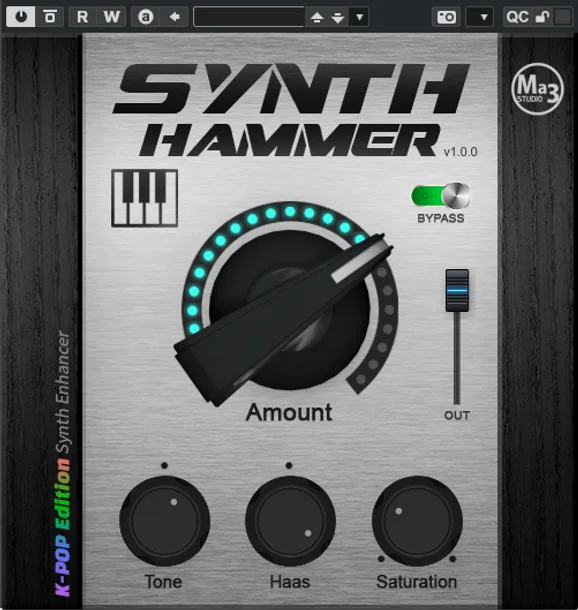
- Central Amount knob for quick synth enhancement
- Tone control for shifting the emphasis between bass and treble
- Haas-based stereo widening using left/right time differences
- Saturation control for extra harmonic density and solidity
- Output level control for matching processed and bypassed volume
- Automation support for all plugin operations
Description
Synth Hammer is a Windows enhancer effect from Ma3 Studio built for making synth parts sound brighter, wider, and more forceful with very little setup. The official page presents it as a K-pop-focused synth sweetener, with a central Amount control feeding the plugin's internal enhancement algorithm.
The control set is intentionally compact. Amount adds the main intensity, Tone shifts the emphasis toward bass or treble, Haas widens the signal with a left/right time offset, Saturation adds density and overtones, and Out trims the final level.
That makes Synth Hammer useful as a fast finishing effect on leads, hooks, risers, and other synth lines that need extra presence without building a long insert chain. It is more of a one-knob color and width processor than a surgical EQ, so the best workflow is to push the Amount knob until the part speaks, then rebalance tone, width, saturation, and output by ear.
The official Ma3 Studio page still lists Synth Hammer at $0.00 and says it is free for life without restrictions. KVR also lists version 1.0.0 as a free Windows VST/VST3 effect with Windows 7 or later 64-bit support.
Video Preview


Frequently Asked Questions
Is Synth Hammer a general mastering enhancer?
It can be inserted wherever a Windows VST/VST3 effect is supported, but the developer positions it specifically around synth sounds. It is best treated as a fast color, width, and intensity effect for individual synth parts rather than a full mastering processor.
What does the Haas control do?
The Haas control widens the sound by using a time difference between the left and right channels. That can make synth lines feel broader, but it should be checked in mono if the part is critical to the mix.
Does Synth Hammer include separate VST2 and VST3 installers?
Yes. The current ZIP from Ma3 Studio contains separate Synth Hammer VST Setup.exe and Synth Hammer VST3 Setup.exe installers, plus a user manual PDF.
Is this a subtle processor or an obvious effect?
It can do quick enhancement from a small control set, but the combination of tone shaping, Haas widening, and saturation can become obvious if pushed. Use the Out control to level-match while judging the processed sound.