
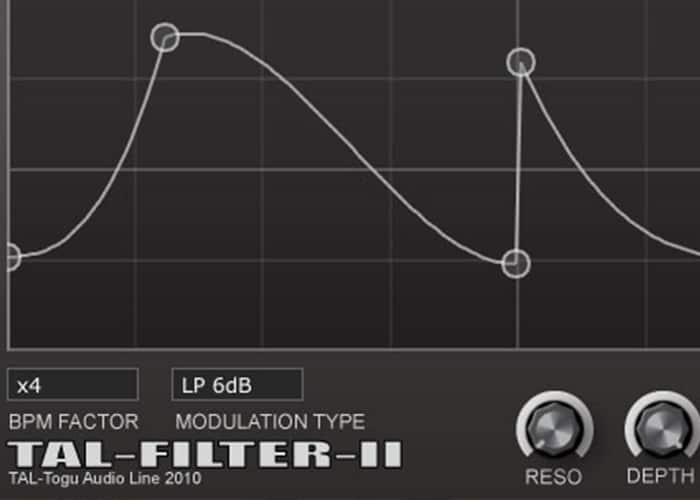
TAL-Filter 2 Filter
Key Features
- Seven 4x oversampled filter types from the TAL-NoiseMaker engine covering low-pass, high-pass, band-pass, and notch responses
- Freeform graphical envelope editor with click-to-add and double-click-to-remove node editing for custom modulation shapes
- Tempo-synced modulation with beat subdivisions from x1 to x32 and dotted note patterns for precise rhythmic effects
- Dedicated pan and volume modulation modes for auto-panning, tremolo, and trance gate effects beyond standard filter sweeps
- Built-in input saturation that adds harmonic warmth and grit when driving the signal into the filter stage
- MIDI NoteOn trigger support for resetting the modulation envelope on note events, enabling performance-driven effects
- Universal Binary 2 with native Apple Silicon support on macOS alongside Windows and Linux compatibility
Description
TAL-Filter-2 is a tempo-synced filter and modulation plugin from Togu Audio Line that turns static audio into rhythmic, evolving textures. It ships with the same 4x oversampled filters found in TAL-NoiseMaker, covering seven filter types including LP 24 dB, LP 18 dB, LP 12 dB, LP 6 dB, HP 12 dB, BP 12 dB, and Notch 12 dB.
The plugin goes well beyond basic filtering by offering dedicated pan and volume modulation modes. Pan modulation places percussion and effects across the stereo field in sync with your project tempo, while volume modulation handles everything from subtle tremolo to hard-gated trance patterns.
A freeform graphical envelope editor sits at the heart of the workflow, letting you click to add nodes and double-click to remove them. Beat subdivisions from x1 through x32 and dotted note options provide precise rhythmic control, and a depth knob scales the modulation intensity without redrawing the curve.
Version 3.x introduced dedicated cutoff and stereo knobs, MIDI NoteOn triggering for envelope resets, and an optional loop-disable mode for one-shot modulation shapes. The JUCE 7 framework update added native Apple Silicon support across all plugin formats.
Raising the input gain drives the signal into saturation when a filter mode is active, adding harmonic warmth and grit that pairs well with aggressive rhythmic filtering on basses, leads, and pads.
Video Preview

Frequently Asked Questions
How does TAL-Filter-2 compare to Xfer LFO Tool?
Both plugins offer tempo-synced modulation with graphical curve editors, but TAL-Filter-2 includes dedicated multi-mode filters with saturation on top of its volume and pan modulation. LFO Tool focuses primarily on volume shaping and sidechain simulation, while TAL-Filter-2 provides seven filter types for more tonal sculpting.
Can TAL-Filter-2 be triggered by MIDI notes?
Yes, version 3.x added MIDI NoteOn trigger support. When enabled, each incoming MIDI note resets the modulation envelope to its starting position, which is useful for creating rhythmic effects that follow a keyboard or sequencer performance rather than a fixed tempo grid.
What is the input saturation feature and when should I use it?
Raising the input gain control drives the incoming signal into soft saturation when a filter mode is active. This adds harmonic warmth and subtle distortion that works well on basses, leads, and pads when you want a grittier, more analog-sounding filter sweep.
Does TAL-Filter-2 support Apple Silicon Macs natively?
Yes, the v3.1.x update built on JUCE 7 includes a Universal Binary 2 build that runs natively on Apple M1, M2, and M3 processors. AAX native M1 support was also added for Pro Tools users on Apple Silicon hardware.


