Telescope
Key Features
- Combines thirteen analysis lenses for loudness, dynamics, spectral, stereo, tonal-balance, and musical-key investigation in one plug-in.
- Measures integrated, short-term, and momentary LUFS, loudness range, and true peak against documented broadcast-standard methods.
- Shows PSR, PLR, a short-term histogram, and clip-event history to make headroom and dynamic behaviour easier to inspect.
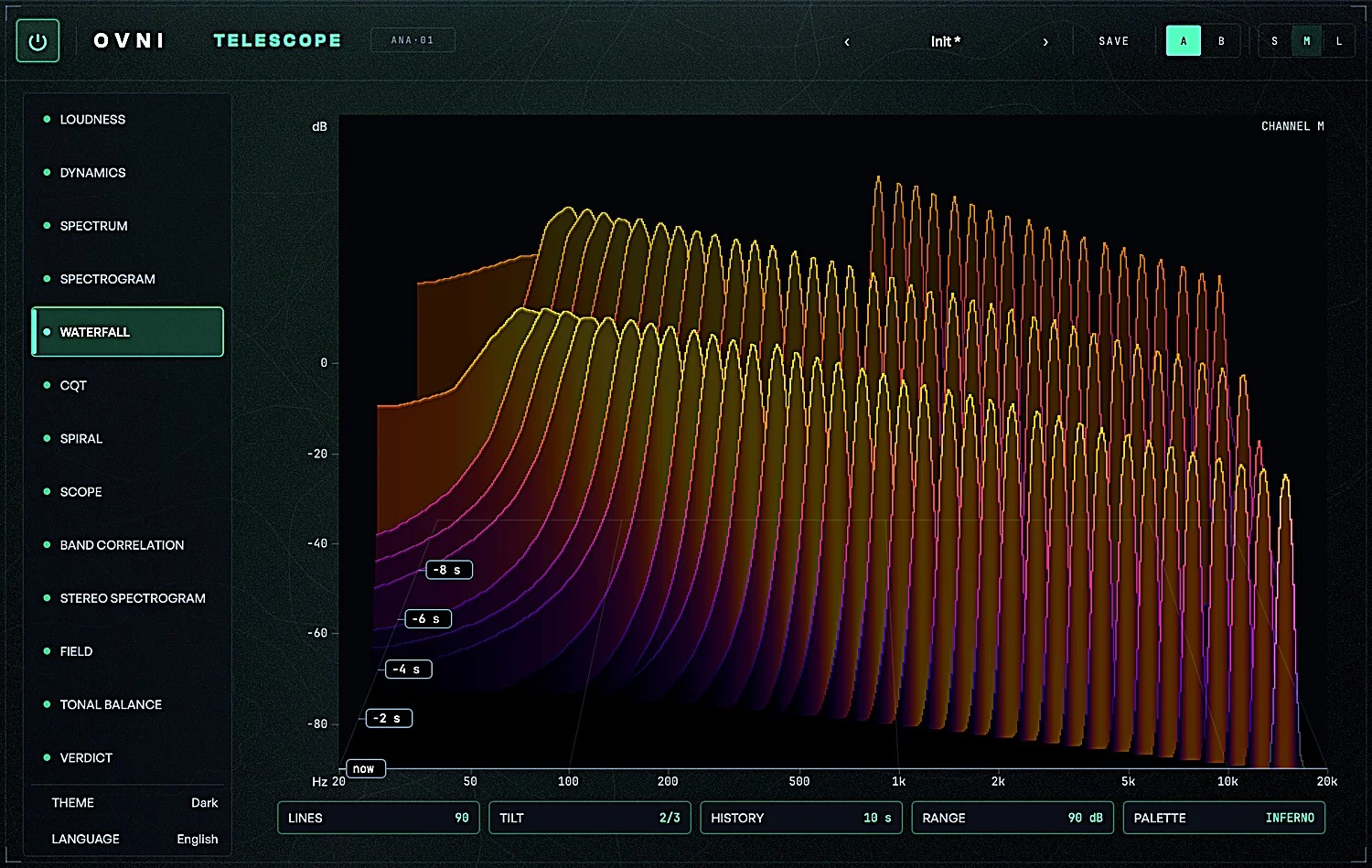
- Offers FFT, spectrogram, waterfall, constant-Q and chromagram views, with version 0.3 fixes for Windows scrolling, smoother Waterfall motion and peak hold.
- Includes scope, per-band correlation, and stereo-spectrogram tools for checking width, balance, phase behaviour, and mono loss.
- Compares tonal balance with a loaded reference track and reports deterministic Verdict findings with their measured value and rule ID.
- Passes audio through bit-exactly with zero latency and can share measured numbers locally with EYEPIECE 0.2 without transmitting audio.
Description
Telescope is a stereo audio-analysis plug-in from OVNI Audio that combines loudness, dynamics, spectrum, stereo, tonal-balance, and key-oriented views in one interface. Its thirteenth view, Verdict, turns its measurements into rule-linked findings, while the plug-in remains a bit-exact pass-through with no added latency.
For mix and mastering checks, Telescope covers integrated, short-term, and momentary loudness, LRA, true peak, PSR and PLR, plus FFT, spectrogram, waterfall, and constant-Q views. Its stereo tools extend beyond a single correlation value with scope, band correlation, a stereo spectrogram, and pan-direction energy displays.
The Tonal Balance lens compares a mix against a user-loaded reference track after normalising each by integrated loudness. Verdict is deliberately a reporting layer rather than an automatic mix assistant: its 21 deterministic rules identify a measurement and the rule that produced the observation, leaving the decision to the engineer.
Version 0.3.0 restores scrolling in the Windows Spectrogram and Stereo Spectrogram views and fixes hangs or crashes when removing or moving the plugin. It also smooths Waterfall motion and corrects peak hold in Spectrum, CQT and Spiral.
The current release includes VST3/AU for macOS 11 or later and VST3 for Windows 10 or later, with the macOS installer signed and notarized and the Windows ZIP unsigned. Linux x86_64 builds add VST3 and LV2, but remain beta and have not yet been tried in a real DAW.
With EYEPIECE 0.2 open in the same DAW, Telescope can share measured numbers locally while the transport runs. The exchange contains measurements rather than audio, and nothing is sent over the network.
Frequently Asked Questions
Does Telescope process or change the audio passing through it?
No. OVNI Audio describes Telescope as a bit-exact pass-through with zero samples of latency and no tail. The analysis runs separately, so it is designed to measure rather than process the signal.
What does Telescope's Verdict view do?
Verdict applies 21 deterministic rules to its per-second measurement history and writes observations alongside the number and rule that produced each one. It reports measurements rather than making automated mix changes or aesthetic judgments.
Can Telescope compare a mix with a reference track?
Yes. Its Tonal Balance lens compares the mix with a reference track that you load, normalising each track by its own integrated loudness before showing the balance difference. This is intended as a measurement view, not a substitute for listening.
What should I know about the Linux beta?
OVNI Audio supplies VST3 and LV2 for Linux x86_64, built on Ubuntu 22.04 and requiring glibc 2.35 plus GLIBCXX_3.4.30 or newer. The developer says automated tests pass, but this build has not yet been tried in a real DAW; it is not an ARM build.
How is Telescope downloaded?
Use the official Telescope page to choose macOS, Windows or the Linux beta. Its ready-made installer download flow requests an email address for delivery and updates; the developer also keeps the AGPLv3 source publicly available on GitHub.