
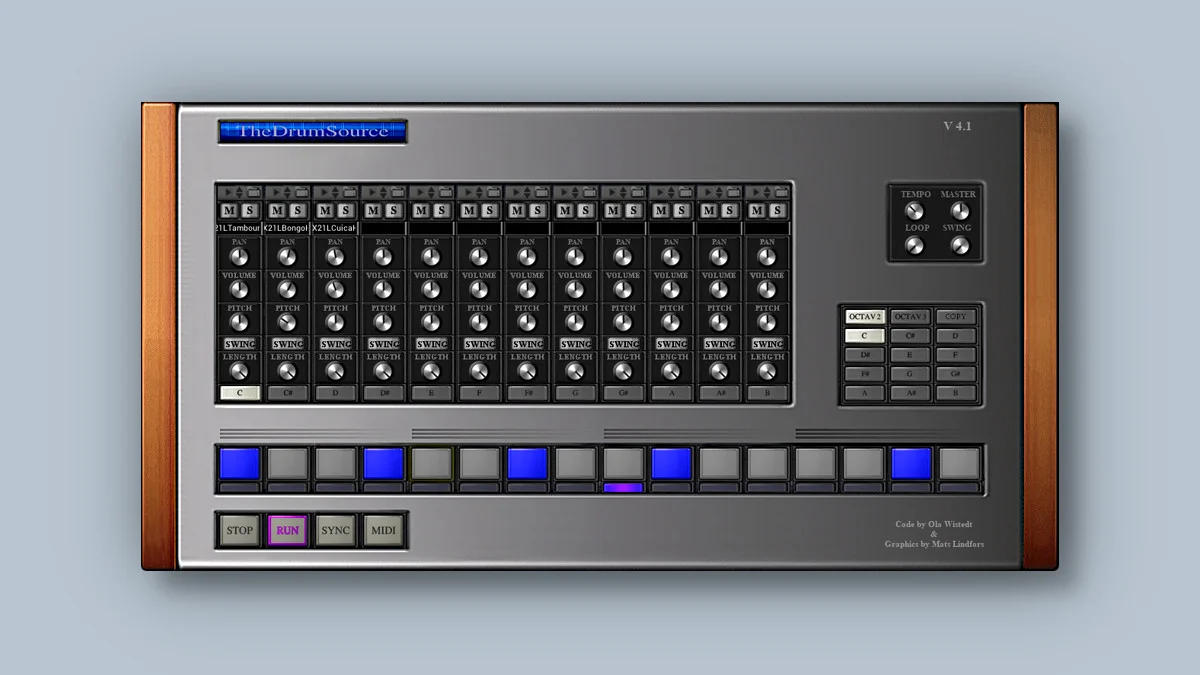
TheDrumSource 4
Key Features
- Built-in step sequencer with 24 patterns and a paint function for rapid beat programming
- 12 dedicated output channels for routing individual drum sounds to separate mixer tracks
- Per-channel volume, pan, pitch, swing, and length controls with mute and solo
- MIDI export sends patterns directly to your DAW's piano roll for further editing
- Smart sample browsing algorithm for fast navigation through large WAV libraries
- Three playback modes — RUN, SYNC, and MIDI — for standalone, DAW-locked, and external control workflows
- Resizable GUI with full parameter automation and multi-instance support
Description
TheDrumSource 4 is a sample-based drum machine plugin from Swedish developer Witech that pairs a multi-pad sampler with a built-in step sequencer. It loads WAV samples across multiple channels, each with independent volume, pan, pitch, swing, and length controls for detailed sound shaping.
Version 4 introduces a paint function for faster pattern programming, MIDI export for moving sequences into your DAW's piano roll, and a copy button for duplicating patterns between slots. A smart sample browsing algorithm makes it quicker to navigate large sample libraries directly within the plugin.
The sequencer supports 24 patterns with per-channel mute and solo, plus three playback modes: RUN for standalone triggering, SYNC for locking to your DAW's transport, and MIDI for external control. Twelve dedicated output channels let you route individual drum sounds to separate mixer tracks for independent processing.
Standalone mode now includes a tempo knob and a loop knob that automatically cycles through patterns, turning TheDrumSource into a self-contained beat sketchpad. The resizable interface keeps things accessible whether you run it inside a session or on its own.
TheDrumSource 4 supports full parameter automation, and you can load multiple instances to layer different kits across a project without conflicts.
Frequently Asked Questions
What sample formats does TheDrumSource 4 support?
TheDrumSource 4 works with WAV samples. You can load any WAV file onto its pads and use the built-in browser with the smart algorithm to navigate your sample folders quickly.
Can I export my drum patterns as MIDI?
Yes, version 4 added MIDI export. On Windows, exported MIDI files are stored in C:\ProgramData\Witech\TheDrumSource by default. You can drag them into your DAW's piano roll for further arrangement and editing.
Does TheDrumSource 4 work in standalone mode?
Yes, it runs as a standalone application in addition to VST3 and AU. Standalone mode includes a dedicated tempo knob and a loop knob that automatically cycles through patterns, so you can sketch beats without opening a DAW.
How do I route individual drum sounds to separate mixer channels?
TheDrumSource 4 provides 12 dedicated output channels. Assign each pad to its own output within the plugin, then set up corresponding input tracks in your DAW to apply independent EQ, compression, or effects to each drum sound.


