
Thenatan Clone
Key Features
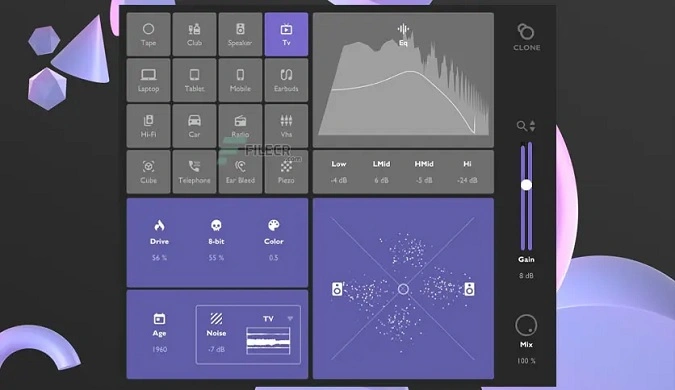
- 16 convolution-based speaker simulations covering studio monitors, car stereos, phones, tablets, TVs, and headphones for comprehensive mix referencing
- Built-in warm distortion and LoFi degrader (bit crusher) for adding analog character and creative coloration to mixes
- Color knob (tilt EQ) for quick adjustments to the overall brightness or darkness of the audio signal
- Time Machine effect with Age knob providing nine unique sound sources for vintage tape texture and digital grit
- Noise player with nine professionally recorded ambient textures including TV static, tape hiss, and environmental sounds
- Real-time goniometer and stereo widener for visual stereo monitoring and precise width control
- 4-band EQ for fine-tuning the frequency balance of each speaker simulation
Description
Clone by Thenatan is a convolution-based speaker simulation plugin that lets you audition mixes through 16 different playback environments. It emulates studio monitors, hi-fi speakers, headphones, car stereos, phones, tablets, and TVs, giving you a fast way to check mix translation without leaving your DAW.
Beyond reference monitoring, Clone includes a suite of creative processing tools. Warm distortion and a LoFi degrader add analog character, while the Color knob acts as a tilt EQ to shift the overall brightness or darkness of the signal.
The Time Machine effect, borrowed from Thenatan's VYBZ plugin, provides an Age knob with nine sound sources that add authentic texture and grit reminiscent of tape machines and cheap digital devices. A built-in noise player offers nine professionally recorded textures including TV static, tape hiss, and rain for further sound shaping.
A real-time goniometer and stereo widener round out the feature set, letting you visually monitor and adjust stereo width. The interface keeps every control on a single page, making it straightforward to switch between speaker models and dial in effects without menu diving.
Clone is available in VST2, VST3, and AU formats for macOS (64-bit, M1 compatible under Rosetta 2) and VST2/VST3 for Windows (32-bit and 64-bit). It works in most major DAWs excluding Pro Tools.
Video Preview


Tips
- Use the convolution-based speaker simulations to check mix coherence across different playback systems.
- Experiment with the warm distortion and LoFi degrader to add unique textures to your mixes.
- Adjust the color knob to fine-tune the brightness or darkness of your audio signals.
- Utilize the "Time Machine" effect to add vintage or gritty textures to your tracks.
- Incorporate the noise player to introduce subtle background textures and enhance the overall sound.
- Use the goniometer and stereo widener to control the stereo spread and achieve the desired width in your mixes.
- Take advantage of the user-friendly interface to quickly switch between different speaker simulations and effects.
Frequently Asked Questions
How accurate are Clone's speaker simulations compared to real devices?
Clone uses convolution-based modeling, which captures the acoustic response of real speakers and environments through impulse responses. While no plugin can perfectly replicate the physical experience of listening through actual hardware, the convolution approach provides a reliable approximation for catching mix issues like excessive bass, harsh frequencies, or poor mono compatibility across different playback systems.
Can Clone be used as a creative effect rather than just a mix-checking tool?
Yes. Beyond mix referencing, Clone's distortion, LoFi degrader, Time Machine, and noise player make it a capable lo-fi processing tool. Users have noted that the speaker simulations combined with the Age knob and noise textures can produce convincing vintage and degraded tones useful for lo-fi hip hop, vaporwave, and similar production styles.
Does Clone work with Pro Tools?
No. Clone does not support the AAX plugin format, which means it is not compatible with Pro Tools. It works with most other major DAWs through its VST2, VST3, and AU (macOS only) formats.


