TO-Sampler
Key Features
- Records audio directly or imports WAV files for fast custom sample creation
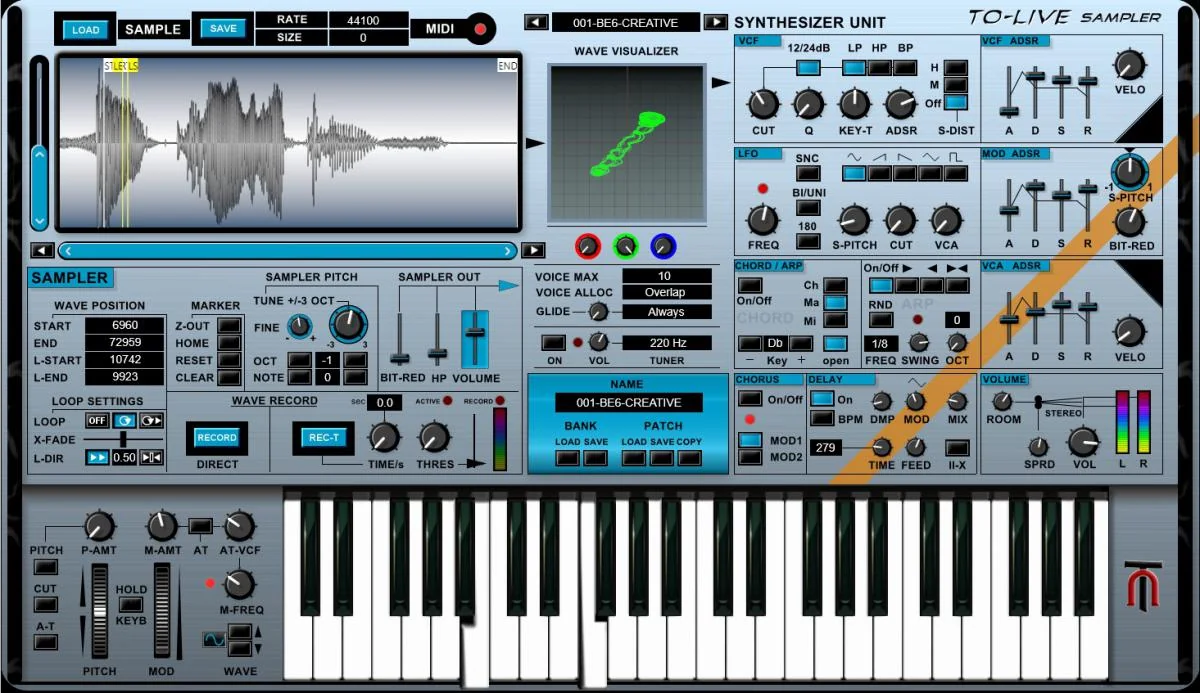
- Waveform editor with start, end, loop start, loop end, and crossfade loop controls
- Single sample oscillator with adjustable polyphony and factory bank support for up to 128 sounds
- Synth-style shaping with multimode filtering, VCF and VCA envelopes, modulation envelope, and LFO routing
- Lo-fi and spatial effects including bit reduction down to 2-bit, soft distortion, chorus, delay, room simulation, and stereo spread
- Built-in arpeggiator, chord generator, and tuner for playable sketching and performance setups
- Manual VST3 installation plus a standalone Windows build based on Savihost
Description
TO-Sampler is a Windows sampler instrument from TubeOhm that runs as a VST3 plugin or standalone app. It is built for quick sample capture, WAV import, loop editing, and synth-style shaping rather than massive multisampled libraries.
The workflow centers on one sample oscillator with a visible waveform editor for start, end, loop start, and loop end points. Crossfade looping helps turn short recordings into playable sustained sounds, while the 5 MB per-sample limit keeps the instrument focused on compact patches and fast experiments.
Behind the sampler, TubeOhm adds a familiar synthesis path with adjustable polyphony, a multimode filter, VCF and VCA ADSR envelopes, a modulation envelope, and an LFO for pitch, filter, and amplitude movement. Built-in bit reduction down to 2-bit, soft distortion, chorus, delay, room simulation, and stereo spread give the plugin enough processing to make raw captures feel finished inside one window.
Performance tools make it more than a basic sample player. The included arpeggiator, chord generator, tuner, 128-sound factory bank, and standalone microphone-recording workflow suit small custom instruments, lo-fi one-shots, experimental textures, and fast sketching without opening a larger sampler.
Frequently Asked Questions
Is TO-Sampler a full multi-gigabyte sampler platform?
No. KVR lists a 5 MB maximum sample size, and the official manual describes a single sample oscillator. It is better treated as a fast creative sampler for compact sounds than as a large orchestral or drum-library workstation.
Can TO-Sampler run without a DAW?
Yes. The official manual describes a standalone version using Savihost, with audio and MIDI hardware setup inside the standalone app. It also runs as a VST3 instrument in compatible Windows DAWs.
Does TO-Sampler include an installer?
No. TubeOhm states that the sampler does not come with an installer and must be copied manually into the VST directory. The manual says the downloaded package includes VC_redist.x64.exe if the plugin does not start after installation.
Can it record samples directly?
Yes. The official manual describes direct recording, including instant recording and threshold-triggered recording modes. This is most relevant in the standalone workflow, although the manual notes that some DAWs may also support direct recording through internal routing.