
TugMidiSeq
Key Features
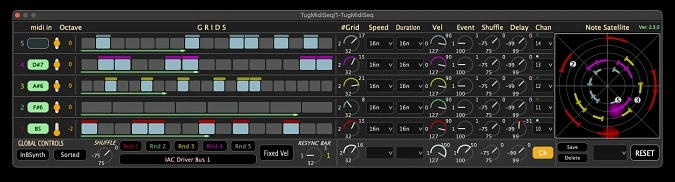
- Polyphonic arpeggiator and step sequencer with independent control over speed, beat division, velocity, duration, and octave per lane
- Per-lane loopback MIDI routing to send each sequencer voice to a different instrument in your DAW
- Sequencer matrix with per-step velocity editing, per-line shuffle, and per-line delay offsets for intricate rhythmic variation
- Randomization engine for generating unexpected melodic and rhythmic variations across the entire sequence
- Dual note-assignment modes: automatic low-to-high pitch sorting or manual first-in ordering for flexible workflow
- Circular note-flow display providing real-time visual feedback of polyphonic pattern movement
- Built-in sample-based synth engine for instant pattern auditioning without needing an external instrument
Description
TugMidiSeq by 2Rule is a polyphonic arpeggiator and MIDI sequencer that transforms held chords into elaborate rhythmic patterns. The plugin automatically arranges incoming notes from lowest to highest pitch, mapping each to a dedicated lane in its sequencer matrix where you control speed, beat division, velocity, duration, and octave independently.
Version 2.3.0 introduced per-lane MIDI routing via loopback, letting you send each sequencer lane to a different instrument within your DAW. A solo button isolates individual lanes for focused editing, and a sample-based engine replaces the original SineWave synth for more reliable pattern auditioning.
The sequencer matrix offers deep per-note control including shuffle per line, delay offsets up to an eighth note, and velocity adjustment for individual steps via Shift-click. Randomization parameters let you generate unexpected variations across the entire sequence, while the ReSync function keeps everything locked to your DAW's transport.
A circular note-flow display provides real-time visual feedback of the pattern as it plays, making it easier to understand complex polyphonic movement at a glance. TugMidiSeq also supports both automatic pitch-sorted note assignment and a manual "first-in" mode where notes fill the next empty lane in the order you play them.
Available as a VST3 and Audio Unit plugin for Windows and macOS, TugMidiSeq is offered as donationware through Gumroad with presets included to help you get started quickly.
Video Preview


Tips
- Use the loopback MIDI feature to route each lane to different instruments for complex arrangements.
- Utilize the solo button to focus on individual lanes during the sequencing process.
- Experiment with the sample-based sequencer/arpeggiator for more robust and varied patterns.
- Adjust the variable speeds, beats, velocities, and durations to create dynamic and evolving sequences.
- Take advantage of the randomization options to generate unique and unexpected musical ideas.
- Use the built-in SineWave synth to quickly audition and refine your patterns.
- Save your favorite settings as presets for easy recall in future projects.
- Make use of the ReSync feature to ensure your sequences stay in time with your DAW.
- Explore the sequencer matrix for detailed and intricate pattern creation.
- Adjust note colors and other visual elements to suit your workflow and improve clarity.
Frequently Asked Questions
How does TugMidiSeq handle chord input?
When you play a chord, TugMidiSeq automatically sorts the notes from lowest to highest pitch and assigns each to a separate lane in the sequencer matrix. Alternatively, you can switch to 'NoteFirstIn' mode where notes fill lanes in the order you play them, and releasing a note frees its lane for the next incoming note.
Can each sequencer lane trigger a different instrument?
Yes, version 2.3.0 added per-lane loopback MIDI routing. Each lane can be routed to a different instrument in your DAW, turning TugMidiSeq into a multi-timbral sequencing hub from a single chord input.
Does TugMidiSeq work with all DAWs?
TugMidiSeq is available as a VST3 and Audio Unit plugin, so it works with DAWs that support MIDI effect routing for these formats. DAWs like Ableton Live, FL Studio, Logic Pro, and Reaper all support it, though MIDI routing setup varies by host.
What changed between version 2.2 and 2.3?
Version 2.3.0 added per-lane MIDI routing via loopback, a solo button for isolating individual lanes, and a sample-based sequencer engine. Earlier version 2.2 introduced per-line shuffle, per-line delay, and per-step velocity adjustment via Shift-click.


