Unirock HumStrat
Key Features
- HSS-style virtual electric guitar instrument for Windows hosts
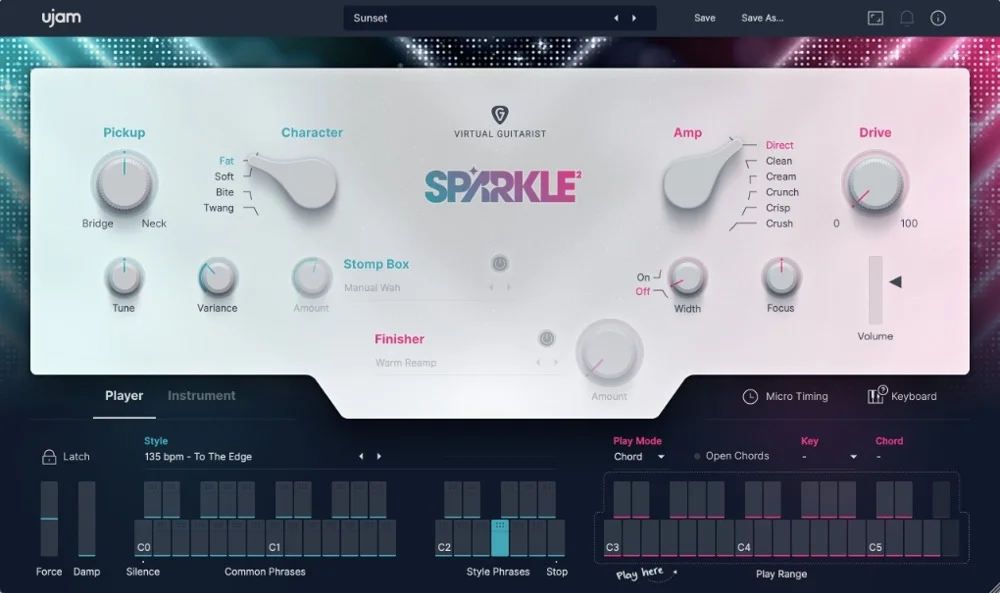
- Five keyswitchable pickup positions covering bridge humbucker, combined positions, middle, and neck tones
- Sample library covers every fret with round-robin variation and multiple velocity layers
- Performance articulations include sustain, palm mute, dead notes, harmonics, slides, vibrato, legato slide, and pick scrapes
- DI-style output is ready for external amp sims, cabinet processing, pedals, and mix effects
- Standalone application is included alongside the 64-bit VST3 plugin
Description
Unirock HumStrat is a Windows electric guitar instrument built around an HSS-style guitar signal that you can sequence inside a DAW or run as a standalone app. It is designed as a DI source, so the most useful results come from pairing it with an amp simulator, cabinet IR, pedals, and mix effects.
The library focuses on playable guitar programming rather than pre-recorded riffs. It includes every fret, five pickup positions, round-robin variation, multiple velocity layers, and keyswitch access to core articulations such as sustain, palm mute, dead notes, harmonics, slides, vibrato, legato slide, and pick scrapes.
HumStrat suits producers who want to sketch convincing guitar parts before recording a player, layer extra rhythm lines behind real guitars, or build rock, pop, funk, and electronic hooks without using loop packs. The main limitation is platform support: this first release is Windows-only, with VST3 and standalone builds provided through the developer's GitHub release page.
Frequently Asked Questions
Does Unirock HumStrat include amp and cabinet tones?
HumStrat is intended to output a DI-style electric guitar signal. Use an amp simulator, cabinet loader, pedals, or other guitar effects after the instrument to create the final tone.
Can the pickup positions be changed from the interface?
The developer notes that pickup switching is handled by keyswitches. The guitar image in the interface is visual and does not change the pickup position when clicked.
What should I do if the samples are missing after installation?
For the installer version, reinstall and choose the correct sample library folder. For the portable ZIP, keep the SampleLibrary folder beside the VST3 bundle so the plugin can find it automatically.