
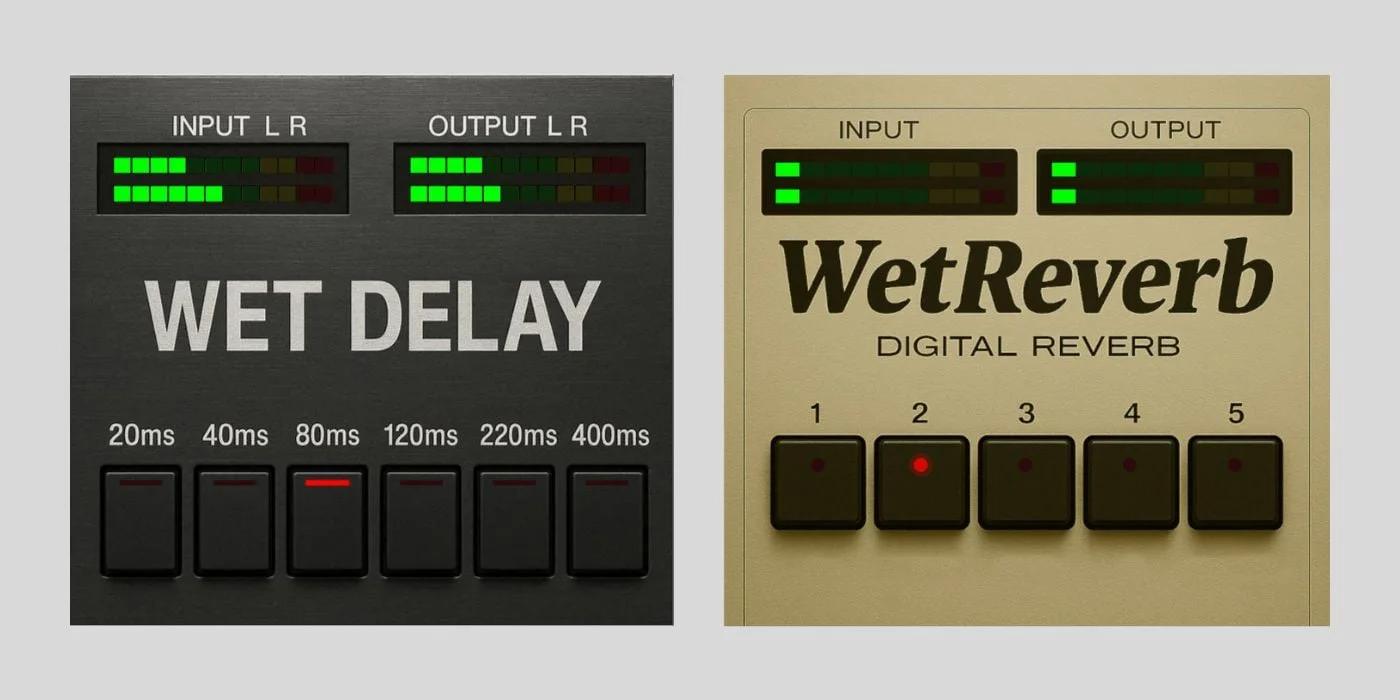
WetReverb & WetDelay
Key Features
- Five reverb algorithms (Room, Plate, Hall, Cathedral, Cosmos) with Schroeder-style diffusion and mode-specific pre-delay, comb filtering, and high-frequency damping
- Six fixed delay times from 20 ms to 400 ms with vintage-style 80 Hz high-pass and 9 kHz low-pass filtering at 6 dB per octave
- 24 kHz internal sample rate with 12-bit quantization and TPDF dither for authentic 80s digital character
- 100% wet output with 1% stereo channel crosstalk, designed for send/return bus routing
- Real-time nine-segment LED metering on both input and output for each plugin
- Fully open-source under the MIT license with complete C++ source code on GitHub
- Cross-platform support for Windows, macOS (Intel and Apple Silicon), and Linux as native VST3
Description
WetReverb and WetDelay are a pair of open-source VST3 effects built by Ronald Klarenbeek that recreate the sound of 1980s rack-mount digital processors. Both plugins run at a fixed 24 kHz internal sample rate with 12-bit quantization and TPDF dither, deliberately limiting bandwidth and resolution to produce the gritty, band-limited character of early digital hardware.
WetReverb offers five reverb algorithms — Room, Plate, Hall, Cathedral, and Cosmos — each with its own comb-filter count, pre-delay, and early-reflection pattern tuned by Schroeder-style diffusion with per-mode high-frequency damping. The interface strips away every conventional parameter: there are no decay, damping, or mix knobs, just five mode buttons and LED metering.
WetDelay provides six fixed delay times ranging from 20 ms to 400 ms, routed through the same 24 kHz/12-bit processing chain with vintage-style filtering that rolls off below 80 Hz and above 9 kHz at 6 dB per octave. There is no feedback or tempo sync, so the plugin produces a single darkened echo rather than cascading trails.
Both effects output 100% wet signal with 1% stereo channel crosstalk that simulates analog circuit bleed, designed to sit on send/return buses where the DAW's own fader controls the wet/dry balance. CPU usage stays under 1%, and the combined memory footprint is roughly 500 KB.
Built directly on the Steinberg VST3 SDK without JUCE or any third-party framework, the full C++ source code is available under the MIT license for study or modification.
Frequently Asked Questions
Why do WetReverb and WetDelay only output wet signal?
Both plugins are designed for send/return bus routing, where you control the dry/wet balance using your DAW's send level or return fader. This approach gives you precise control over the effect amount without a built-in mix knob, which is how classic hardware rack units were typically connected in studios.
Can I adjust reverb decay time or delay feedback?
No. WetReverb only lets you switch between five preset algorithms (Room, Plate, Hall, Cathedral, Cosmos), and WetDelay offers six fixed delay times with no feedback. The minimalist design is intentional, prioritizing character and immediacy over tweakability.
Does WetDelay sync to my DAW's tempo?
WetDelay does not support tempo sync. It provides six fixed delay times (20 ms, 40 ms, 80 ms, 120 ms, 220 ms, and 400 ms). If you need tempo-locked repeats, you would need to calculate the matching BPM manually or use a different delay plugin alongside it.
Why do the plugins sound dark and lo-fi?
Both plugins process audio at a fixed 24 kHz internal rate with 12-bit quantization, cutting off frequencies above 12 kHz and introducing subtle quantization artifacts. Combined with vintage-style filtering that rolls off below 80 Hz and above 9 kHz, this creates the band-limited, slightly gritty sound characteristic of early 1980s digital rack effects.
Do WetReverb and WetDelay require a macOS code-signing workaround?
Yes. Because the plugins are unsigned, macOS will quarantine them on first download. You need to run a terminal command to remove the quarantine attribute before your DAW can load them. The developer provides the exact command in the installation instructions on GitHub.


