AudioTeleporter
Key Features
- Streams live DAW audio to a browser link so the listener does not need a plugin, app, or account.
- Works on a master bus, stem, or any bus that needs to be monitored remotely.
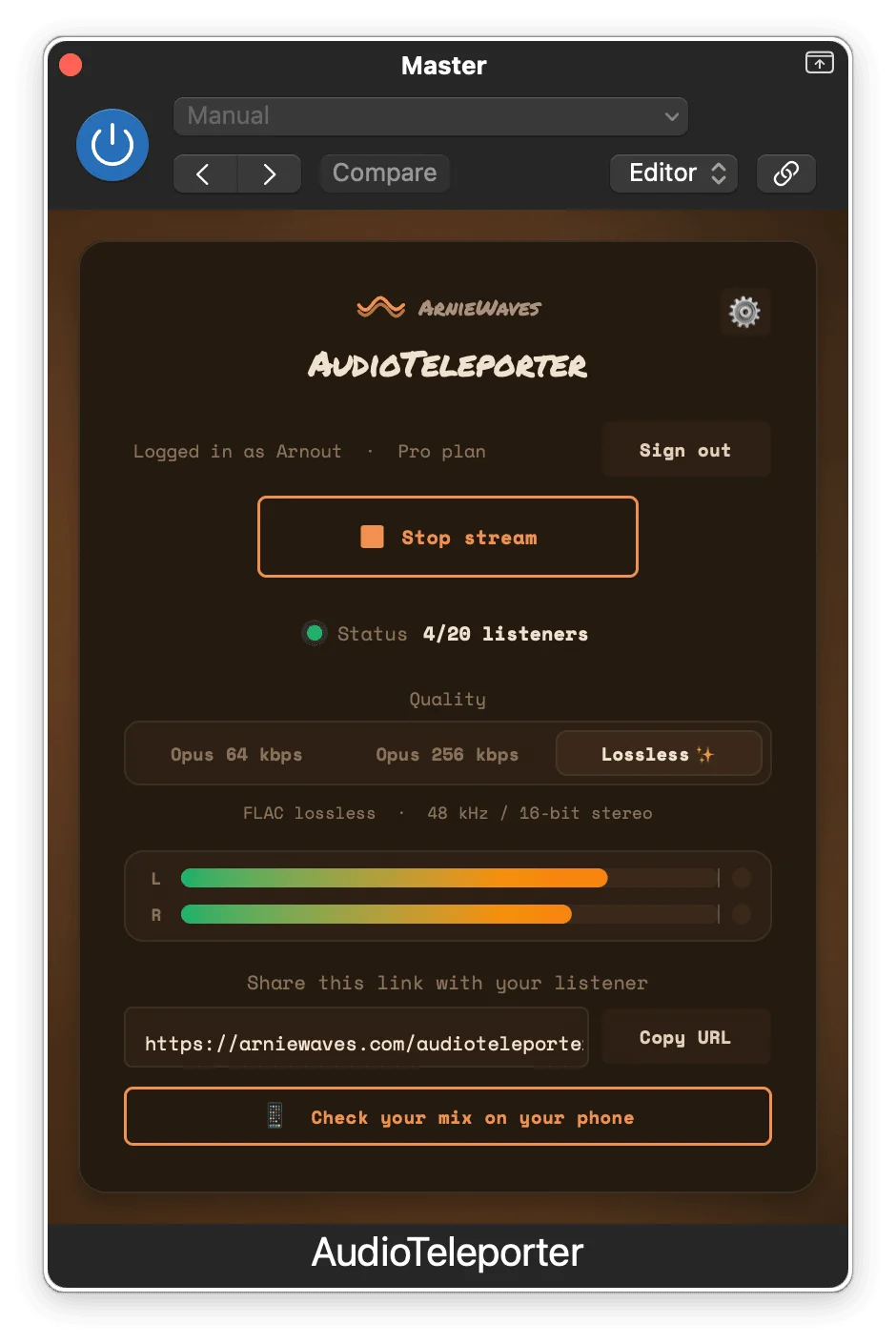
- Selectable quality options cover low-bandwidth Opus streaming and lossless FLAC on the paid Pro tier.
- Listener-adjustable buffer ranges from 50 ms to 1 second depending on the connection.
- macOS support includes VST3, AU, and AAX formats; Windows support includes VST3.
- Release API lists version 1.4.0 builds for macOS and Windows, with installer sizes of about 8 MB and 6 MB.
- Designed around one-way listening for mix checks, client approvals, and collaborator feedback rather than two-way talkback.
Description
AudioTeleporter is a DAW audio streaming plugin for sending a live mix, stem, or bus to a remote listener through a browser link. Put it on the master bus, start a stream, choose the quality, and the listener can hear the session without installing software on their side.
The permanent free tier is limited, but still practical for one-person feedback or phone translation checks. It supports one listener at Opus 64 kbps, while the paid tiers add more listeners, higher Opus quality, and lossless FLAC at 48 kHz.
This is a focused monitoring tool rather than a full remote production suite. Audio moves one way only, so client notes, talkback, or coaching still need a separate call or chat.
For mix approvals and remote references, the appeal is speed: no bounce, no upload, and no version confusion. The release is especially useful for producers, mixers, and mastering engineers who want to send the exact DAW output to a client, collaborator, phone, or second room while the session is still open.
Frequently Asked Questions
Does the listener need to install anything?
No. The listener opens the link in a browser and does not need an account, app, or plugin. The AudioTeleporter plugin only runs on the sender's DAW system.
What is included in the free tier?
The official pricing page lists a zero-cost tier with one listener, Opus 64 kbps streaming, browser playback for listeners, and adjustable latency. The same page presents it as a real free tier with no card and no countdown clock.
Can AudioTeleporter be used for remote recording or jamming?
Not as the main communication tool. The developer states that it moves audio in one direction only, and BPB notes that it is not meant for musicians playing together in real time.
Which plugin formats are available?
The official page lists VST3, AU, and AAX on macOS, and VST3 on Windows. The download page describes the macOS installer as universal for Apple Silicon and Intel, and the Windows installer as 64-bit.
How does it differ from broader collaboration tools?
AudioTeleporter focuses on moving the DAW output to a listener quickly instead of bundling chat, recording, or session-management features. That makes it more direct for mix approval and translation checks, but you still need a separate call or chat for feedback.