
Blindfold EQ
Key Features
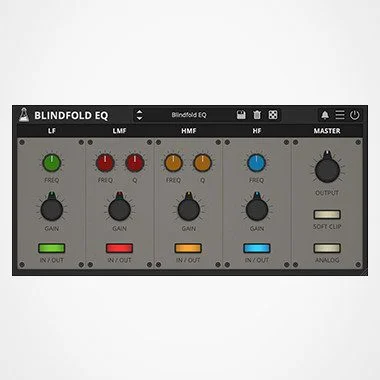
- Four-band EQ layout with low shelf, low-mid, high-mid, and high shelf sections
- Unmarked frequency, gain, and Q controls encourage ear-led tonal decisions
- Analog behavior and soft clipping options add subtle coloration beyond clean EQ moves
- Preset system and randomizer provide starting points without turning the interface into a visual analyzer
- Resizable plugin interface keeps the deliberately minimal control concept usable in modern sessions
- Desktop support spans macOS, Windows, and Linux, with an additional iOS and iPadOS AUv3 version
Description
Blindfold EQ is AudioThing's four-band equalizer built around a simple constraint: the controls are intentionally unmarked, so EQ choices have to be made by ear. It gives you low shelf, low-mid, high-mid, and high shelf bands without frequency, gain, or Q readouts competing for attention.
The plugin is not a surgical analyzer-style EQ, even though later versions can reveal values when needed. Its strongest use is broad tonal shaping, peak hunting, and ear-training work where the lack of numbers keeps the decision focused on how the source actually changes.
AudioThing keeps the design practical rather than purely conceptual. Blindfold EQ includes analog behavior, soft clipping, a resizable interface, presets, and a randomizer, while the current desktop build covers macOS, Windows, and Linux in VST2, VST3, AU, AAX, and CLAP formats.
The official page routes downloads through an email form and confirms that no iLok or internet activation is required after installation. User comments and third-party coverage generally frame it as a useful, no-fuss EQ with a deliberately opinionated interface rather than a replacement for a fully visual parametric workhorse.
Video Preview

Frequently Asked Questions
Why are the EQ controls unmarked?
Blindfold EQ is based on the idea that visible frequency and gain values can push engineers into EQing by sight. The control labels identify the band and function, but the exact values are hidden so you judge the result by listening.
Can Blindfold EQ still show exact EQ values?
AudioThing added an option to show EQ values in version 1.1. The core workflow is still built around hidden values, but the option makes the plugin easier to check when a session needs more precision.
Is Blindfold EQ better for surgical or musical EQ moves?
It is better suited to broad musical shaping and ear training than detailed visual surgery. For dense corrective work, a full-featured parametric EQ with spectrum feedback, dynamic bands, and precise readouts will be faster.
Does Blindfold EQ need iLok or online activation?
AudioThing states that the plugin does not require an iLok and does not need an internet connection for activation. The official download flow does require submitting a name and email address to receive download links.


