
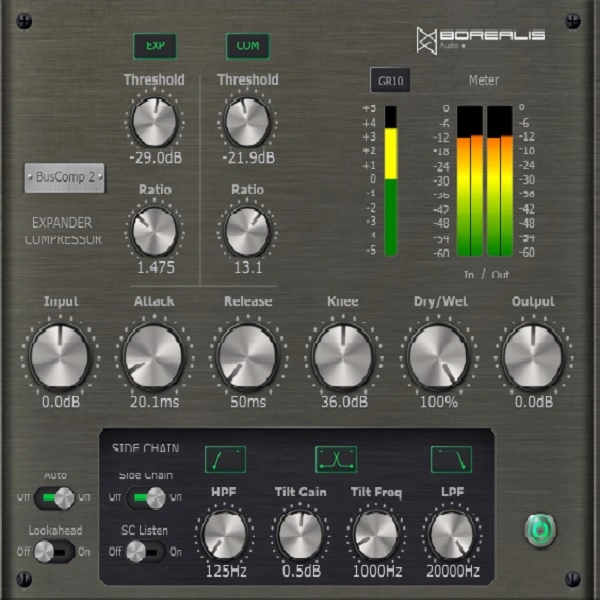
BusComp 2 – Compressor Expander
Key Features
- Dual dynamics engine combining compressor and expander with independent threshold and ratio controls for each section
- Sidechain high-pass filter prevents low-frequency content from triggering unwanted compression on drum busses and full mixes
- Mid-range filter isolates specific frequency bands for targeted compression or expansion processing
- Lookahead capability captures fast transients cleanly, ideal for percussive material like snares and toms
- Auto makeup gain automatically compensates output level after compression for consistent volume
- Flexible knee control adjusts the compression curve from hard-knee punch to soft-knee transparency
- Universal Binary support runs natively on both Intel and Apple Silicon Macs without Rosetta
Description
BusComp 2 by Borealis Audio is a dynamics processor that combines a compressor and an expander in a single interface. Its standout feature is the ability to expand the signal in one dynamic range while compressing in another, giving you independent threshold and ratio controls for each section.
The plugin shares attack, release, and knee controls across both processors, which keeps the interface streamlined for fast decision-making. A sidechain high-pass filter and a mid-range filter let you target specific frequency ranges for processing, reducing low-end pumping on drum busses and full mixes.
Lookahead functionality handles fast transients without clipping, making it effective on snare and tom tracks where the expander can restore punch. Auto makeup gain maintains consistent output levels after compression, so you can focus on shaping dynamics rather than riding faders.
The sound stays transparent and uncolored, performing well on individual tracks, groups, and stereo bus material. It handles everything from gentle bus glue to aggressive drum expansion without introducing noticeable artifacts.
BusComp 2 supports VST3, AU, and AAX formats with Universal Binary support for Intel and Apple Silicon Macs. It runs on macOS 10.12 through 12 and Windows 8 through 11 (64-bit), requiring a minimum of 2 GB RAM.
Video Preview

Tips
- Use the expander section to add punch to drum tracks by setting a separate threshold from the compressor.
- Apply the sidechain high-pass filter to prevent low frequencies from triggering the compressor.
- Utilize the mid-range filter to focus compression or expansion on specific frequency ranges.
- Experiment with the lookahead feature to handle fast transients more effectively.
- Adjust the knee settings to achieve a smoother or more aggressive compression curve.
- Enable auto makeup gain to maintain consistent output levels after compression.
- Try using the expander on snare and tom tracks to enhance their presence in the mix.
Frequently Asked Questions
Can I use the compressor and expander sections independently?
Yes, each processor can be enabled or disabled independently. You can run the compressor on its own, the expander on its own, or both together with separate threshold and ratio settings for each.
Do the compressor and expander have separate attack and release controls?
No, the attack, release, and knee controls are shared between both processors when engaged. This keeps the interface simple but means both sections respond with the same timing characteristics.
Does BusComp 2 work with Pro Tools on Apple Silicon?
BusComp 2 supports AAX format, though compatibility with native Silicon AAX mode in Pro Tools has not been officially confirmed by the developer. It runs reliably through Rosetta 2 on Apple Silicon Macs.
What is the best way to use the expander on drums?
Set the expander threshold just below the level of the hits you want to preserve. This reduces bleed and room noise between hits, adding definition to snares and toms. Combine it with the sidechain high-pass filter to prevent kick drum energy from affecting the expansion.


