
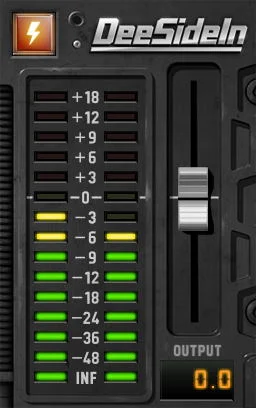
DeeSideIn
Key Features
- Mix incoming audio into a chosen point in an effects chain.
- Combine harmony or drum tracks after earlier processing stages.
- Use the host DAW’s sidechain routing to supply the incoming signal.
- Split audio to another track as part of a routing setup.
- Monitor the combined output with the level meter.
- Adjust output level with the fader or bypass the plug-in from its interface.
Description
DeeSideIn is an audio routing utility from DOTEC-AUDIO that mixes an incoming signal into a track at a chosen point in its effects chain. It uses the host DAW’s sidechain routing to bring that sound into the plug-in, so the available routing options depend on the host.
Place it after an effect when a second sound needs to join the signal later in the chain. For example, harmonies or drums can be combined at a chosen insert point instead of processing every source through the same preceding effects.
The developer also suggests using the plug-in when splitting sound to another audio track. Its compact interface includes an output level meter, an output fader and a bypass control, giving you a way to monitor and adjust the combined output.
DeeSideIn is a focused utility for arranging signal flow, not a collection of effects or a replacement for a DAW’s routing controls. Set up the sidechain send in your host first, then position the plug-in where the incoming audio should be mixed.
DOTEC-AUDIO offers separate 64-bit Windows and macOS downloads on its product page. The developer lists VST2, VST3 and AAX for Windows, with AU added on macOS; check the host’s sidechain support before building a session around the plug-in.
Frequently Asked Questions
How does DeeSideIn receive audio from another track?
Use your DAW’s sidechain routing to send the source audio to DeeSideIn. The routing setup and available options depend on the host.
Where should I place DeeSideIn in an effects chain?
Place it at the point where you want the incoming signal to join the track. For example, placing it after an effect lets the incoming audio join after that processing stage.
Can I adjust the level after the signals are combined?
Yes. The interface has an output fader and a meter for the combined output, plus a bypass control.


