
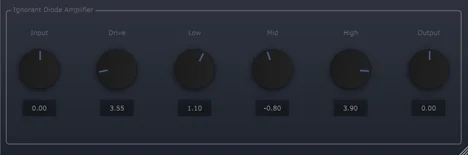
Diode Amplifier
Key Features
- Guitar amp processing with switchable speaker emulation
- Load a custom cabinet impulse response and retain it between sessions
- Return to the built-in cabinet response with the IR reset control
- Bright switch adds or removes a peak filter around 4 kHz
- High tone control adjusts the amp’s upper-frequency response
- Automatic fallback to the built-in IR when a saved external file is missing
Description
Diode Amplifier is a guitar amp plugin by Viator DSP that combines an amp sound with switchable cabinet emulation and support for your own cabinet impulse responses. It gives guitarists a compact way to shape a recorded signal in a compatible host without assembling a large virtual rig.
The cabinet section can be switched off when you want to use another speaker simulator. You can also load a personal cab IR directly into the plugin, and it remembers the selection between sessions.
A Bright button switches a peak filter around 4 kHz, letting you choose whether to add that upper-frequency emphasis. The high tone control offers another way to adjust the amp’s top end, while the reset control returns the cabinet to its built-in impulse response.
If a saved external IR has been moved or deleted, the plugin falls back to its built-in IR when reopened. The developer also reduced the direct signal level with the cabinet switched off, a useful detail when changing routing during a session.
The developer’s update page provides Mac and Windows installers, and the discovery listing identifies VST and AU formats. Check your host and operating system compatibility before relying on this older release in an important project.
Frequently Asked Questions
Can I load my own cabinet impulse responses?
Yes. The plugin can load and remember a custom cabinet IR. If the file is moved or deleted, it falls back to the built-in IR when reopened.
Can I turn off the cabinet simulation?
Yes. The Cab button switches off the speaker emulation so you can use a separate cabinet processor. The developer says the direct signal level is reduced when the cab is off.
What does the Bright button do?
It toggles a peak filter around 4 kHz. You can switch it on or off to choose the amount of upper-frequency emphasis.


