
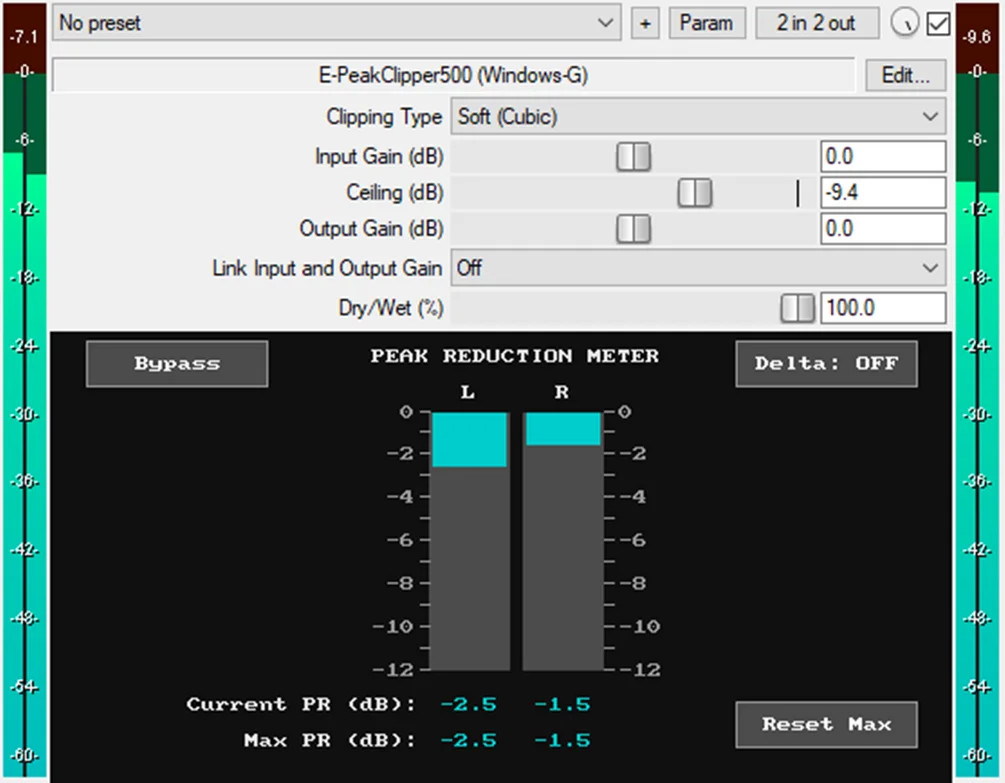
E-PeakClipper500
Key Features
- Three clipping modes cover Soft Cubic, Hard, and a 50/50 blend for cleaner control or more obvious harmonic edge.
- Realtime current and maximum peak-reduction meters show how much transient material is being clipped on each channel.
- Ceiling, input gain, output gain, and dry/wet controls handle the essential peak-shaving workflow without a complex mastering interface.
- Auto-linked input and output gain helps keep perceived loudness steadier while increasing the amount of clipping.
- Delta monitoring solos the difference between the dry and processed signal so you can hear what the clipper is removing.
- Smooth bypass is designed to avoid clicks and to compare the processed signal against a roughly level-matched dry path.
- JSFX delivery works directly in REAPER and can run in VST3, AU, or CLAP hosts through the open-source YSFX wrapper.
Description
E-PeakClipper500 by Windows-G is a JSFX clipper built for quick peak control in REAPER and compatible hosts through the open-source YSFX wrapper. It focuses on the core clipper workflow: drive the input, set the ceiling, watch the reduction meters, and move on.
The plugin gives you Soft Cubic, Hard, and 50/50 Blend clipping modes, plus input gain, output gain, dry/wet mix, and a ceiling range from -30 dB to 0 dB. Realtime current and maximum peak-reduction readouts make it easier to see how much transient material is being shaved off each channel.
Its practical extras are aimed at fast level-matched decisions rather than deep mastering-suite control. Auto-linked input and output gain helps maintain perceived loudness while you push the clipper, while Delta and smooth bypass buttons let you audition the removed signal and switch processing without clicks.
As checked on May 19, 2026, the official Gumroad product page is still published, priced at USD 0, marked in stock, and not sales-limited. The download is delivered through Gumroad.
Frequently Asked Questions
Does E-PeakClipper500 only work in REAPER?
It is delivered as a JSFX plugin, so REAPER is the most direct host. The developer also documents using the open-source YSFX wrapper to load it in DAWs that support VST3, AU, or CLAP plugins.
What clipping modes are included?
The official page lists Soft Cubic, Hard, and a 50/50 Soft plus Hard blend. That gives you a cleaner cubic soft-clip option, a more aggressive digital hard clip, and a middle setting between the two.
What is the Delta button for?
Delta solos the difference between the wet and dry signals. It is useful when setting the ceiling and gain because it lets you hear the peak material being removed instead of only judging by loudness.


