
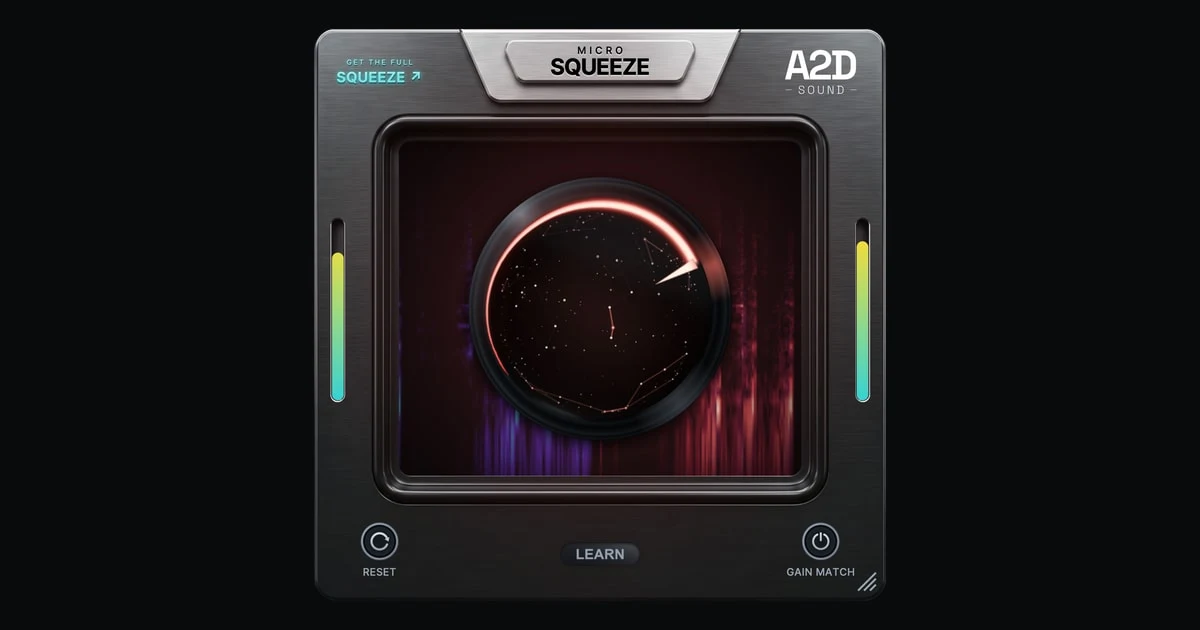
Micro Squeeze
Key Features
- One-knob workflow drives a detail-preserving clipper into a brickwall limiter
- Learn listens for up to ten seconds and suggests a starting point from peak, RMS, and loudness measurements
- Gain Match holds the processed output peak at the input peak for easier headroom comparisons
- Live spectrogram highlights the areas where loudness and density were added
- Zero-latency, no-lookahead processing can stay active while tracking and mixing
- Reset returns the knob to zero, disables Gain Match, and clears the previous Learn reading
- 64-bit VST3 and AU formats support Windows and macOS hosts
Description
Micro Squeeze is a one-knob loudness effect that combines a detail-preserving clipper with a brickwall limiter. A2D Sound carved it out of the final stage of its full Squeeze processor and released it free for Windows and macOS.
The main control pushes the clipper first, shaving peaks while keeping attacks intact, then brings in more limiting as the signal is driven harder. A final clipping stage sits at the output, and the whole process runs with zero latency and no lookahead.
Learn listens to the loudest section for up to ten seconds, measures peak, RMS, and loudness, then moves the knob to a suggested starting point. Gain Match holds the processed output peak at the input peak, while the live spectrogram highlights where extra density was added.
Micro Squeeze works on individual drums, drum buses, basses, and full mixes that need faster peak control or more level without a long mastering chain. Version 1.0.0 is available as a 64-bit VST3 and AU plugin, and A2D Sound delivers the installer through a free account with no license key, time limit, or disabled features.
Video Preview
Frequently Asked Questions
What does the main Micro Squeeze knob control?
It drives a detail-preserving clipper first and then hands more work to the brickwall limiter as you turn it up. A final clipping stage sits at the end of the chain.
What happens when I press Learn?
Learn listens for up to ten seconds, measures peak, RMS, and loudness, and moves the knob to a suggested starting point based on the audio. A2D Sound recommends playing the loudest section before pressing it.
Does Gain Match make the before and after equally loud?
No. Gain Match holds the output peak where the input peak was, so it preserves peak headroom rather than matching LUFS. The processed signal can still sound louder on average.
Is Micro Squeeze a trial or limited version?
A2D Sound says there is no time limit, license key, or disabled feature. A free A2D Sound account is required to download the installer and receive updates.


