

Key Features
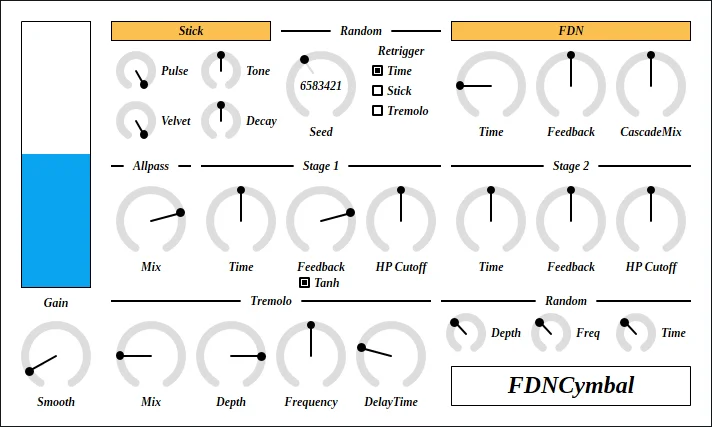
- Synthesize cymbal-like strikes with a note-triggered stick oscillator
- Blend impulse, sine tone and velvet noise to shape the initial hit
- Adjust feedback delay network timing and feedback for impact character
- Sculpt metallic resonances with two allpass stages
- Add cymbal-like movement using tremolo and modulated delay
- Vary timing, stick and tremolo parameters between notes
- Route incoming audio through the instrument as an effect
Description
FDNCymbal is a cymbal synthesizer by Uhhyou that creates metallic percussion and can also process incoming audio. Its design combines a stick oscillator, a feedback delay network and allpass filtering to shape synthetic impacts and resonances.
The stick section lets you balance an impulse, a sine tone and velvet noise, with a decay control for the initial strike. The feedback delay network changes the character of the impact, while two allpass stages provide much of the metallic texture.
A tremolo section adds movement intended to resemble a wobbling cymbal. Randomization controls can vary timing, the stick sound and tremolo between notes, giving sound designers a way to explore less predictable hits.
FDNCymbal also accepts audio as an effect, although the developer notes that it starts muted and requires a MIDI note to activate its output. Feedback settings can cause unstable output, so begin at a low level and consult the manual before experimenting.
The developer offers VST 3 builds for Windows, Linux and macOS. The Linux build targets Ubuntu 24.04, and the macOS build is not notarized, so installation may require extra steps described in the developer's manual.
Frequently Asked Questions
Can FDNCymbal process other audio?
Yes. The developer says it can be used as an effect, but it starts muted and needs a MIDI note-on to produce output.
What creates the metallic sound?
The developer attributes most of the metallic texture to the Schroeder allpass section. The feedback delay network contributes to the impact sound, particularly at short time settings.
Are there any feedback precautions?
The developer warns that nonzero FDN feedback can cause unstable output. Start at a low level and consult the manual's caution section before adjusting it.
Does it include presets?
The developer provides presets with the plug-in package and links to them separately on the product page. The manual explains where to install them on each platform.


