


Key Features
- Three-band EQ based on an early 1970s discrete Class A design
- Fixed 60 Hz low band for stepped bass adjustments
- Fixed 10 kHz high band for stepped high-frequency shaping
- Five selectable midrange frequencies with stepped boost
- Modeled input and output transformers add analog-style character
- Automatic gain compensation and switchable oversampling
- Resizable interface with touchscreen support and a dedicated bypass
Description
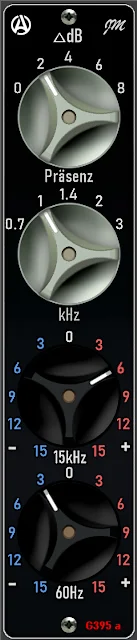
G395a by Analog Obsession is a three-band equalizer inspired by an early 1970s discrete Class A design. Its fixed low and high bands, selectable midrange and modeled input and output transformers offer a direct route to broad tonal shaping.
The low band works at 60 Hz and the high band at 10 kHz, each with stepped boost and cut. The mid band selects five frequencies from 700 Hz to 3 kHz and provides stepped boosts, making it useful for bringing a chosen part of a sound forward.
Automatic gain compensation helps keep level changes from distracting you as you adjust the EQ. Oversampling can be switched on from the Analog Obsession logo, while the plugin label serves as a bypass control for comparisons.
The limited frequency choices make G395a suited to quick character adjustments on individual tracks or a mix bus rather than detailed corrective work. A reviewer at Real Home Studio describes its tone as smooth and natural, and highlights its use for tonal shaping on buses.
Version 2 supports resizable controls and touchscreens. Analog Obsession lists VST3, AU and AAX versions for macOS and VST3 and AAX for Windows, with separate graphics requirements for each platform.
Video Preview

Frequently Asked Questions
What frequencies can G395a adjust?
The low and high bands are fixed at 60 Hz and 10 kHz, with plus or minus 15 dB in 3 dB steps. The mid band offers 700 Hz, 1, 1.4, 2 and 3 kHz with up to 8 dB of boost.
Does G395a support Apple Silicon?
Yes. The developer lists Intel and Apple Silicon support for macOS, with macOS 10.11 or higher and a Metal-capable graphics card required.
How do I enable oversampling?
Click the Analog Obsession logo to toggle oversampling. The logo turns red when it is enabled.
Can I resize the interface?
Yes. Drag the handle at the bottom right to resize the interface from 50% to 200%; the developer recommends saving a default preset in your DAW to retain your preferred size for new instances.


