
Glassbox
Key Features
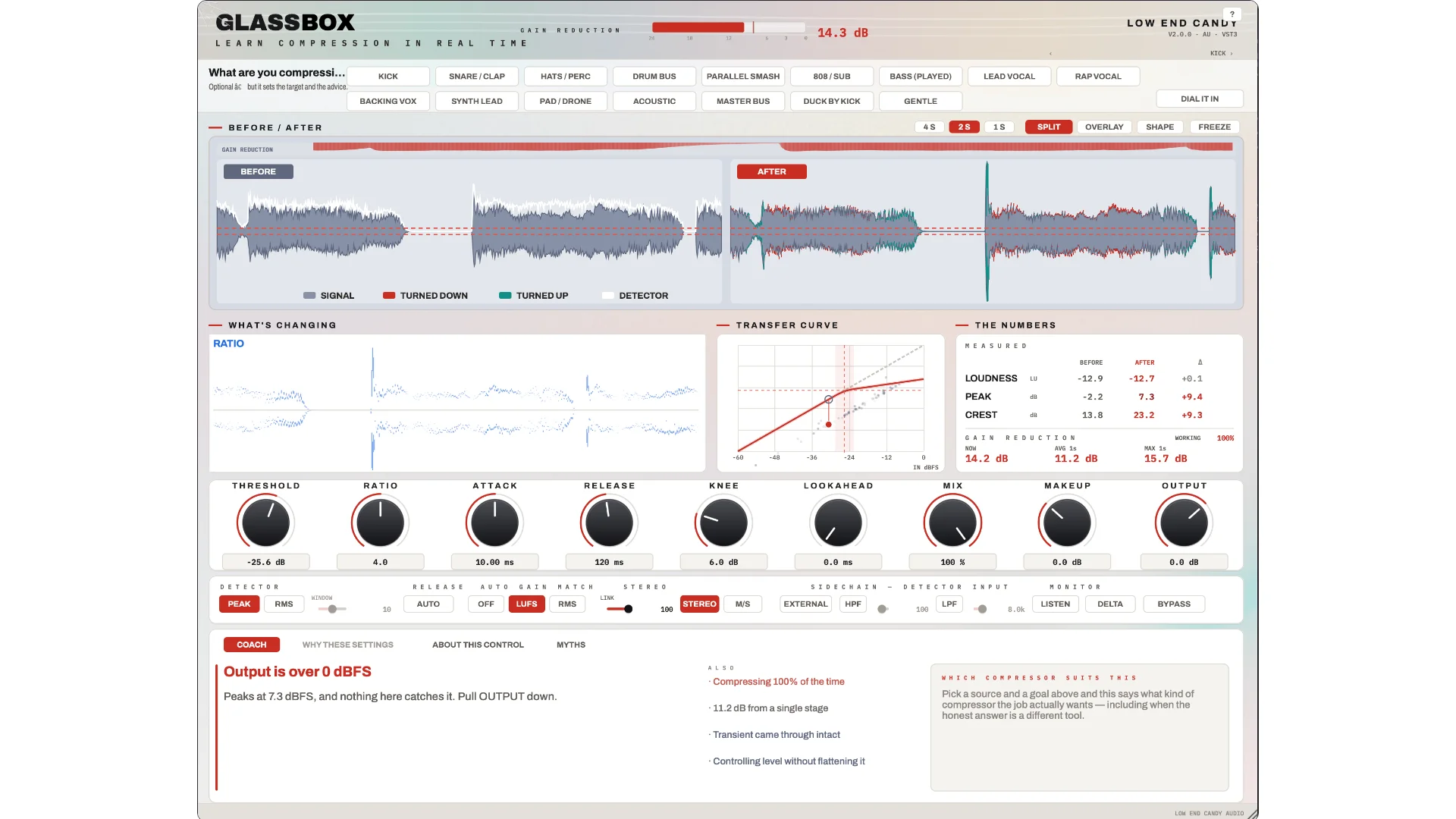
- Split before-and-after waveform scope shows the original and compressed signal on the same scale
- Measured LUFS, peak, crest, detector level, Working percentage, and gain-reduction readouts explain what the compressor is doing
- Live Coach, control spotlights, myths, and transient-focused views connect parameter changes to audible results
- Seventeen source recipes cover kicks, vocals, buses, pads, sidechain ducking, and master-bus compression
- Full compressor controls include Auto release, lookahead, parallel mix, peak or RMS detection, and variable stereo linking
- External sidechain input includes high-pass and low-pass filtering, listen mode, and mid/side operation
Description
Glassbox is a full-featured compressor from Low End Candy built to teach compression on the producer's own audio while it works. Its interface turns gain reduction into something visible, pairing a before-and-after waveform view with detector, threshold, transfer-curve, loudness, peak, crest, and gain-reduction readouts.
Under the teaching layer is a feed-forward, log-domain compressor with threshold down to -60 dB, ratio to 60:1, attack from 0.05 to 250 ms, release from 5 to 2500 ms plus Auto, adjustable knee, lookahead, parallel mix, peak or RMS detection, and variable stereo linking. External sidechain support includes high-pass and low-pass filters, listen mode, and mid/side operation.
The Split scope displays unprocessed and processed waveforms at the same scale, using color to show where level was removed or restored. Auto Gain uses K-weighted LUFS or RMS matching for more reliable bypass comparisons, while Working % and three gain-reduction timescales reveal whether and how continuously the compressor is acting.
For learning, the Coach explains the most useful current issue, About This Control spotlights the part of the display a parameter affects, and What's Changing isolates a transient so attack and release behavior can be inspected. Seventeen source recipes cover material from kicks to the master bus, and Dial It In moves the threshold toward a recipe's gain-reduction target.
Frequently Asked Questions
Is Glassbox a working compressor or only a teaching visualizer?
Glassbox is a working feed-forward, log-domain compressor with conventional threshold, ratio, attack, release, knee, lookahead, mix, detector, sidechain, and stereo controls. Its teaching and measurement tools are built around the same processing path used on the audio.
How do the source recipes work?
Choose a source and goal to load a starting point with an explanation of the timing choices, a common mistake, and a gain-reduction target. Dial It In then watches the incoming audio and moves the threshold toward that target instead of assuming one threshold will fit every recording.
How does Glassbox make bypass comparisons more reliable?
Auto Gain is enabled by default and can use K-weighted LUFS or RMS matching. This keeps the processed and bypassed signals closer in level so loudness alone is less likely to decide which one sounds better.
How does the Glassbox download work?
The official Glassbox page asks for a name and email, then sends the installer link by email.


