
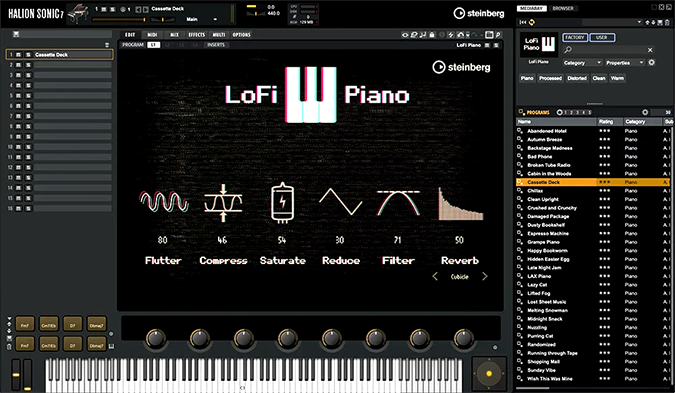
HALion Sonic 7
Key Features
- Free workstation and player for instruments, sounds, and phrases
- Plug-in and standalone operation
- Programs, layers, multis, quick controls, and trigger pads
- FlexPhraser phrase playback with MIDI recording
- Built-in mixing, modulation, dynamics, and spatial effects
- Cross-platform collection content for macOS and Windows
Description
HALion Sonic 7 is Steinberg’s free workstation and player for browsing and playing a broad library of instruments, sounds, and phrases. It can run as a plug-in or in standalone mode, making it useful for fast songwriting, layering, and preset-based production.
The instrument is organized around programs and layers, with performance controls, quick controls, trigger pads, and a slot rack for building multis. Its FlexPhraser can load phrases, vary patterns, and record the generated MIDI output back into a DAW.
Editing layers, automation, mixing, routing, and built-in reverb, delay, EQ, filter, distortion, pitch, modulation, dynamics, and spatial effects are part of the workstation workflow. The accompanying collection content is cross-platform for macOS and Windows and is installed through Steinberg’s content tools.
Use HALion Sonic 7 when one playable workstation can cover keys, drums, synths, loops, and hybrid textures during arrangement and demo work.
Video Preview

Frequently Asked Questions
Can HALion Sonic 7 run without a DAW?
The Steinberg manual documents a standalone version as well as plug-in operation. The standalone host is useful for browsing and playing the instrument outside a DAW.
What does FlexPhraser provide?
FlexPhraser loads phrases and provides parameters and variations for pattern playback. The manual also documents recording its MIDI output into a project.
How is the collection content installed?
Steinberg says the collection content is cross-platform for macOS and Windows and generally arrives as vstsound files inside ISO disk images. Steinberg Library Manager handles installation after the image is mounted.


