
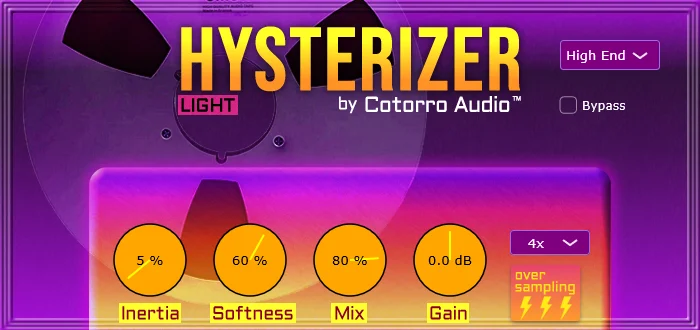
Hysterizer Light
Key Features
- Tape-style hysteresis processing for smoothing fast attacks and peak movement
- Inertia control for setting how strongly transients have to push through the effect
- Softness, Mix, and Gain controls for shaping intensity and output level without a crowded interface
- Eight included presets for quickly auditioning transient-taming settings
- 2x and 4x oversampling modes in the Light edition
- Designed for snares, kicks, picked bass, vocals, and pre-compressor transient smoothing
- Verified by Pluginval at strictness level 10
Description
Hysterizer Light is a Windows VST3 effect that applies tape-style hysteresis to soften fast signal changes and make transients feel less rigid. Instead of chasing a full tape-machine model with wow, flutter, and hiss, it focuses on the lagging response that can make drums, vocals, and bass feel smoother in a mix.
The plugin is built around four direct controls: Inertia, Softness, Mix, and Gain. Inertia sets how strongly the signal resists sudden movement, while Mix lets you blend the processing so the effect can sit behind the dry attack instead of flattening the whole part.
This makes Hysterizer Light useful as a subtle transient-management tool as much as a character effect. It can take some snap out of kicks and snares, control vocal plosives, or sit before a compressor to feed it a smoother signal.
The Light edition includes eight presets, Pluginval verification at strictness level 10, and 2x or 4x oversampling. The main limitation is platform support: the developer currently lists it only as a Windows VST3 download.
Frequently Asked Questions
What does Hysterizer Light do differently from a normal tape saturation plugin?
It focuses on hysteresis, the lagging response associated with magnetic recording, rather than modeling a complete tape deck. That makes it more about transient softening and movement than obvious hiss, wow, flutter, or heavy saturation.
What is the Inertia control for?
Inertia changes how much the signal resists sudden movement. Higher values make fast transients push harder to get through, while lower values keep the response quicker and more detailed.
Where should Hysterizer Light go in a plugin chain?
The developer suggests placing it before dynamics processors when you want a compressor or limiter to see smoother transients. It can also be used directly on drums, vocals, or bass when the source feels too snappy.
How is Hysterizer Light different from Hysterizer Elite?
The Light version includes 2x and 4x oversampling, while Hysterizer Elite adds an 8x oversampling option. The developer also lists nine presets for Elite versus eight presets for Light.


