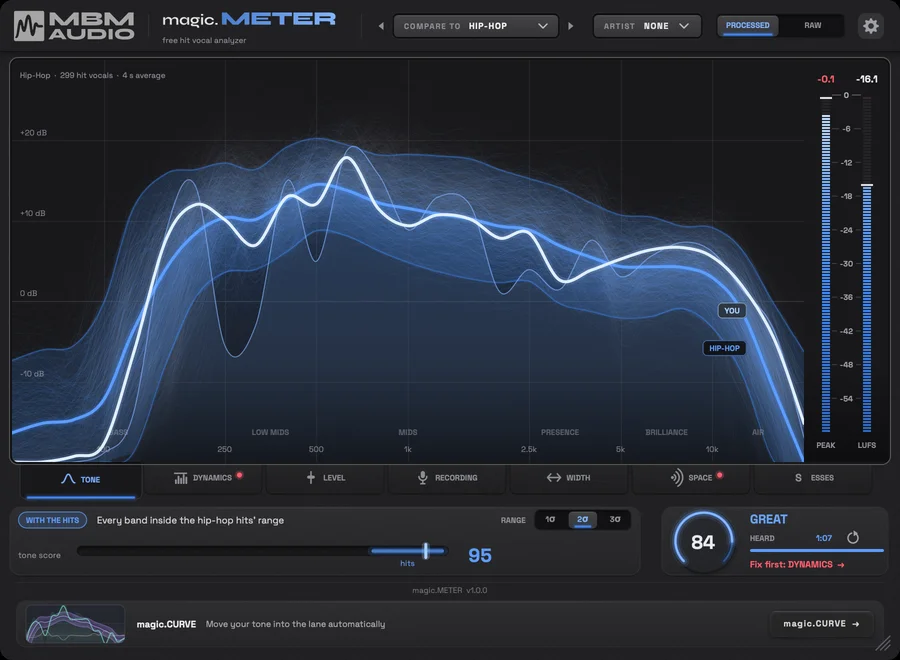
magic.METER
Key Features
- Compares a live vocal with measurements from 3,054 hit-song vocals and suggests what to address first.
- Seven analysis tabs cover tone, dynamics, level, recording, width, space, and sibilance.
- Tone comparisons can target all hits, nine genre groups, eras, or voice types.
- RAW and PROCESSED modes support checking the source take before mixing or the finished vocal chain afterward.
- An optional beat sidechain adds vocal-versus-instrumental level and five-band masking checks.
- The Recording tab identifies clipping, P-pops, noise, hum, recording level, mic distance, room, and mic-range concerns.
- About a minute of singing provides a full reading, while grading starts earlier in playback.
Description
magic.METER is a vocal-analysis plug-in that compares a live vocal against measurements from 3,054 hit-song vocals and points to the first adjustment to consider. It measures rather than processes audio, giving producers an objective reference while they make their own EQ, dynamics, level, width, space, and de-essing decisions.
Seven tabs cover tone, dynamics, level, recording, width, space, and esses. Tone can compare against all hits, nine genres, eras, or voice types, while the recording view checks a raw take for clipping, P-pops, noise, hum, level, mic distance, room, and mic range.
For a finished vocal, insert it after reverb and delay; use the RAW mode first on a dry recording. Sending the instrumental to the sidechain enables level and masking checks, including where the beat covers the vocal across five bands.
A full read takes about a minute of singing, although the plug-in begins grading sooner. The score is a guide rather than an automatic correction: it can suggest the size and direction of a move, but the mix decision remains with the user.
magic.METER is supplied as an email-gated download from Music By Mattie’s product page. It supports macOS 11 or later on Apple silicon and Intel in AU, VST3, and AAX formats, plus 64-bit Windows 10 or 11 in VST3 and AAX formats.
Frequently Asked Questions
Does magic.METER change the sound of my vocal?
No. The developer describes it as a measurement tool: it analyzes the vocal and offers guidance, but it does not process or alter the audio.
Where should I place magic.METER in a vocal chain?
Use PROCESSED mode at the end of a finished vocal chain, after reverb and delay. Use RAW mode first on the dry recording when you want to assess the take and room before mixing.
Do I need to send the beat to the sidechain?
No. The sidechain is optional, but it enables the level and masking checks that show how the vocal sits against the instrumental and where the beat covers it.
How long does magic.METER need to listen?
Music By Mattie says that about a minute of singing provides a full read. The plug-in starts grading before that point and shows how much vocal material it has heard.
Can I compare against a particular vocal style?
Yes. Tone can compare with all hits or nine genre groups: Pop, Hip-Hop, R&B, Country, Latin, Rock, Electronic, Alternative, and Christian/Gospel. It also offers era and voice-type comparisons.