
MIKKO2
Key Features
- Full-resolution cabinet simulation that exceeds the fidelity of standard IR files, capturing raw unprocessed speaker behavior
- 360-degree 3D microphone positioning with continuous control over distance, angle, and proximity effect
- Four modeled classic microphones based on the SM57, R-121, MD421, and KM-184 for diverse tonal options
- Mesa Oversized 4x12 cabinet with original-spec Celestion V30 speakers included in the free edition
- Built-in EQ Balance section with visual frequency analysis and parametric adjustments baked into exported IRs
- Export any mic configuration as a .wav impulse response compatible with all hardware and software IR loaders
- Available as Standalone, VST3, AU, and AAX (Mac) for flexible integration into any recording workflow
Description
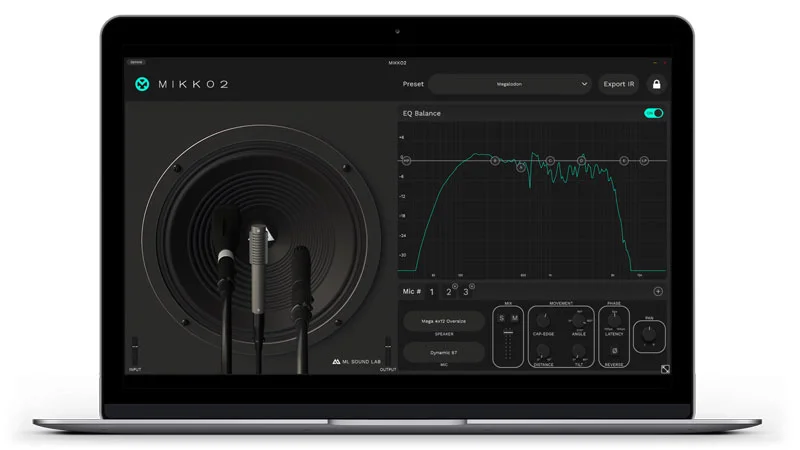
MIKKO2 is a guitar cabinet simulator from ML Sound Lab that goes far beyond a standard IR loader. Designed by Finnish producer Mikko Logren, it uses a full-resolution cabinet simulation engine that captures real microphone positions in 3D space rather than relying on static impulse response snapshots.
The free edition ships with one cabinet — a Mesa Oversized 4x12 loaded with rare original-spec Celestion V30 speakers — and four classic microphones modeled after the Shure SM57, Royer R-121, Sennheiser MD421, and Neumann KM-184. You can drag each mic 360 degrees around the virtual speaker, adjust distance from cap to cone edge, pull back to reduce proximity effect, and tilt the angle for off-axis coloring.
What sets MIKKO2 apart from conventional cab sims is its approach to mic interaction. Rather than loading a single static IR file, the plugin recalculates the frequency response in real time as you reposition each microphone.
This means you can shape your guitar tone after tracking, fitting it to the mix in post rather than committing to a sound at the recording stage. It turns cabinet selection into a mixing decision instead of a tracking commitment.
The built-in EQ Balance section provides visual feedback of the combined mic response and lets you apply additional high-pass, low-pass, and parametric adjustments. Once dialed in, any mic setup can be exported as a standard .wav impulse response file compatible with hardware and software IR loaders.
Users consistently praise MIKKO2 for pairing exceptionally well with amp sims like Neural Amp Modeler, Ignite Amps, and Tonex CS. The raw, unprocessed simulation quality gives a realistic open character that responds well to further mixing, though it does require more tweaking than pre-polished alternatives.
Video Preview


Frequently Asked Questions
Can I load my own IR files into MIKKO2?
No. MIKKO2 is not an IR loader — it is a cabinet simulator that generates impulse responses from real 3D microphone captures. You position mics around the virtual cabinet and then export the result as a .wav IR for use in other loaders and modelers.
What is the difference between MIKKO2 Free and the full version?
MIKKO2 Free includes one cabinet (Mesa Oversized 4x12) and four microphones. The full version unlocks all 38 guitar cabinets, all 8 microphones, and the ability to mix up to 9 mics simultaneously with inter-mic phase control. The full version costs €249.
Does MIKKO2 work well with Neural Amp Modeler and other amp sims?
Yes. Users widely report excellent results pairing MIKKO2 with amp sims like Neural Amp Modeler, Ignite Amps, and IK Multimedia Tonex CS. The raw unprocessed simulation provides a realistic foundation that responds naturally to different amp models.
Can I use the exported IRs in my hardware modeler?
Yes. MIKKO2 exports standard .wav impulse response files that work with any hardware or software IR loader. You can choose the correct format and sample rate for your specific modeler, and use minimum phase transform to ensure compatibility when mixing IRs from different sources.


