MinimogueVA
Key Features
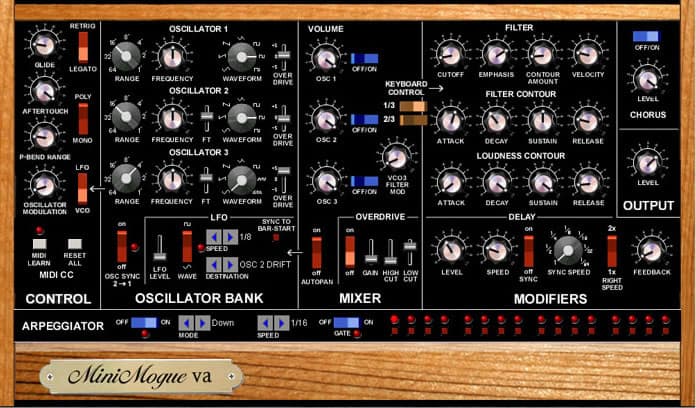
- Three oscillators with six waveforms each, oscillator sync, and analog drift emulation for authentic vintage Moog character
- Dual filter modes: 24dB Moog ladder filter with overdrive and 12dB SEM-style filter with LP/HP crossfade slider
- Zero-delay feedback filter design with envelope curves modeled after the original Minimoog hardware
- Five-note polyphony mode, built-in arpeggiator with octave settings, and 16-note step sequencer
- Programmable digital delay with bucket brigade-style filter cutoff emulation
- Per-oscillator overdrive sliders for thickening the sound with chorus-like harmonic saturation
- Full MIDI CC mapping with MIDI Learn, aftertouch control, and fine-tuning sliders for all three oscillators
Description
MinimogueVA is a virtual analog emulation of the legendary Minimoog synthesizer, developed by Memorymoon Synthesizers (Gunnar Ekornaas). Now at version 3.2 with full 64-bit support, it delivers the thick, unmistakable Moog sound through carefully modeled oscillators, filters, and envelope curves.
The plugin features three oscillators with six waveform options each, a classic 24dB Moog ladder filter with overdrive, and a 12dB SEM-style filter with a crossfade slider between low-pass and high-pass modes. Oscillator drift emulation recreates the subtle pitch instabilities of vintage analog VCOs, adding organic warmth to every patch.
Version 3.0 introduced high-quality oscillators with a noticeably brighter character, zero-delay feedback filters, and envelope curves modeled directly after the original Minimoog hardware. A built-in programmable digital delay now includes a filter cutoff slider to emulate the character of bucket brigade delay circuits.
Beyond the Minimoog's original monosynth design, MinimogueVA adds five-note polyphony, an arpeggiator with octave range settings, and a 16-note step sequencer. Users praise its ability to nail Parliament-style funk basses, soaring psychedelic leads, and hip-hop melodics with authentic analog grit.
MinimogueVA runs on Windows in VST2 and VST3 formats (64-bit), with both dark and white interface skins available. Presets for VST3 require manual installation to the Documents/VST3 Presets directory.
Video Preview


Frequently Asked Questions
Does MinimogueVA work on macOS or Linux?
MinimogueVA is Windows-only. There is no native macOS or Linux version available. macOS users would need to run it through a Windows compatibility layer, though this is not officially supported by the developer.
What is the difference between the Moog filter and the SEM filter in MinimogueVA?
The 24dB Moog ladder filter provides the classic resonant Minimoog sound with an added overdrive slider for saturation. The 12dB SEM filter offers a gentler slope with a crossfade slider that lets you blend smoothly between low-pass and high-pass filtering, similar to the Oberheim SEM topology.
How do I install presets for the VST3 version?
VST3 presets must be installed manually. Copy the sounds from the downloaded zip file to Documents/VST3 Presets/gunnar ekornaas/MinimogueVA. The VST2 version loads presets automatically from the plugin directory.
Can MinimogueVA play chords or is it monophonic only?
While the original Minimoog was strictly monophonic, MinimogueVA includes a Poly Mode that supports up to five-note polyphony. This makes it suitable for pads and chords in addition to the classic mono leads and basses the Minimoog is known for.