
Mixing Cheat Sheet
Key Features
- In-DAW mixing reference that stays available while you work in the session
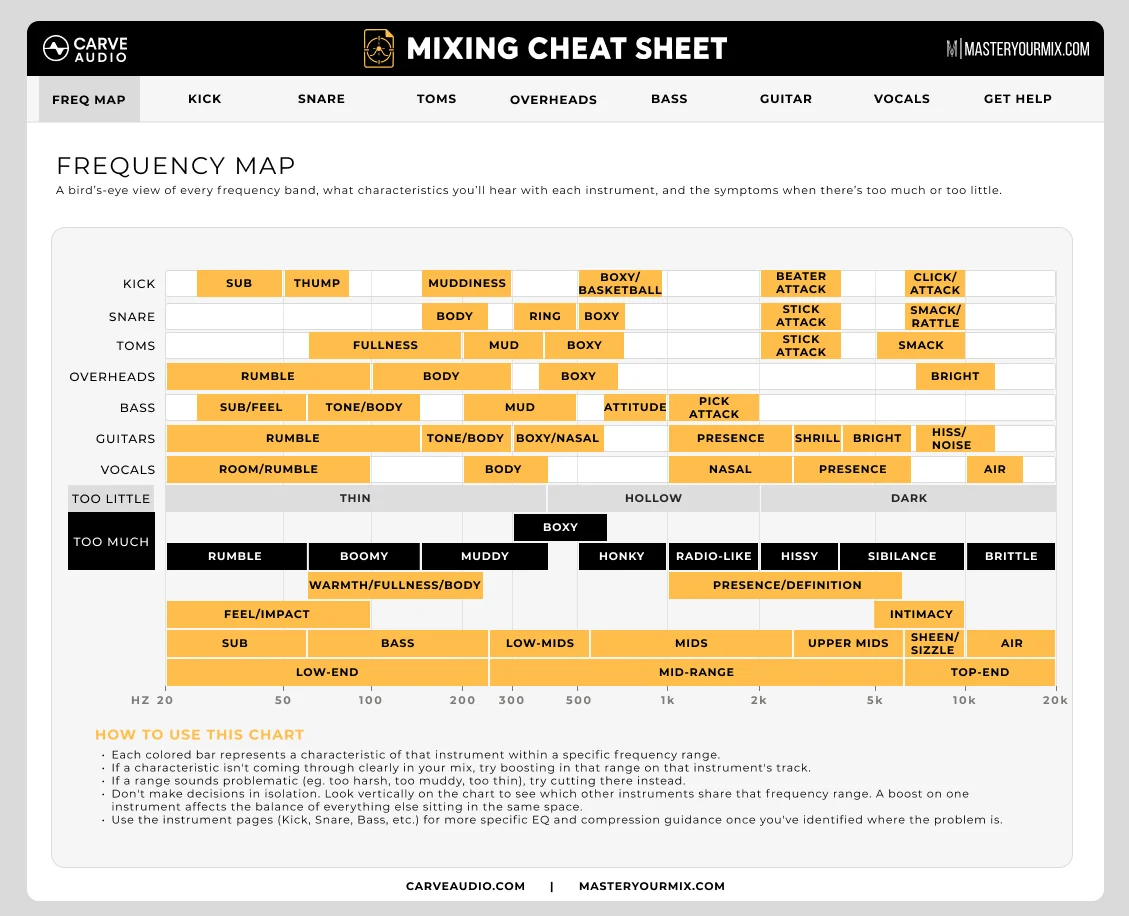
- Main Frequency Map for identifying important tonal ranges across a track or full mix
- Frequency solo workflow for hearing what ranges contribute in context
- Plain-language terms such as mud, body, bite, fizz, harshness, presence, and air
- Individual instrument pages with EQ guidance, compression ideas, and practical mix tips
- Decision-focused guidance that avoids fixed settings and universal cut-or-boost rules
- VST3, AU, and AAX plugin formats for macOS and Windows
Description
Mixing Cheat Sheet is an in-DAW reference plugin that helps producers connect common mix problems to the frequency ranges and processing choices behind them. Instead of acting like another EQ or compressor, it gives you a listening guide that stays open inside the session.
The main Frequency Map is built around practical words such as mud, body, bite, fizz, harshness, presence, and air. You can focus on a range, hear what that part of the spectrum is doing in context, and return to the full signal with a clearer sense of what needs attention.
Carve Audio also includes individual instrument pages with EQ guidance, compression ideas, and mix tips for specific sources. That makes the plugin useful when a vocal feels dull, guitars feel harsh, the low end feels cloudy, or a mix feels unbalanced but the fix is not obvious yet.
The point is decision support rather than fixed settings. Mixing Cheat Sheet avoids one-size-fits-all instructions and works best as a training aid for producers who want to understand what they are hearing before making EQ and compression moves.
Current builds are available for macOS and Windows in VST3, AU, and AAX formats. The official Carve Audio page and Audioloom storefront both list the product at $0, with no limited-time language found during review.
Video Preview

Frequently Asked Questions
Is Mixing Cheat Sheet an audio processor?
It is primarily a reference and ear-training utility rather than a tone-shaping processor. You use it to hear frequency ranges in context and make better EQ or compression decisions with your regular mixing tools.
How is this different from a PDF frequency chart?
A PDF gives you static frequency numbers and generic advice. Mixing Cheat Sheet opens inside the DAW, lets you focus on ranges while audio is playing, and connects descriptive terms to what you are hearing in the current session.
Does Mixing Cheat Sheet tell you exact settings to use?
No. Carve Audio positions it as a decision-making guide, so it helps you understand the problem area before choosing your own EQ or compression move.
Who is Mixing Cheat Sheet aimed at?
It is aimed at home-studio musicians, indie producers, and mix engineers who can hear that something feels wrong but need help identifying the frequency range or mix characteristic behind it.


