
Multi Drummer
Key Features
- Combines a drum-sample voice with optional attack-noise and sub-bass layers for each sound.
- Lets each drum voice be shaped with dedicated amp, filter, and pitch envelopes.
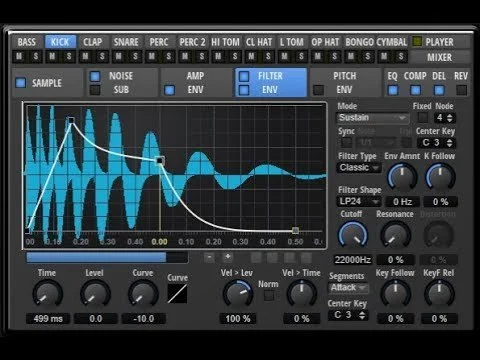
- Provides sample start and end, fades, headroom, level, and pan controls in the Sample interface.
- Includes EQ, compression, delay, and reverb processing for individual drum sounds.
- Offers a Player section for working with loops and a Mixer for drum and master-bus balance.
- Supports Cubase Beat Designer compatibility according to the developer's product page.
- Keeps user sample loading and the 200-plus-loop collection clearly separated as donation-backed additional content.
Description
Multi Drummer is a Freemusicproduction.net drum instrument for designing, playing, and mixing a compact set of drum sounds inside Steinberg HALion Sonic SE. Its core approach combines sample-style editing with synthesized attack noise and sub bass, plus envelope and effects controls for shaping each voice.
The Sample interface provides start and end points, fades, headroom, level, and pan controls, while separate Amp, Filter, and Pitch sections supply per-drum envelope shaping. Each voice can also be processed with EQ, compression, delay, and reverb, making the instrument more flexible than a fixed drum-kit preset.
A dedicated Player and Mixer cover loop playback and per-drum or master-bus level and pan work. The developer lists custom sample loading and a 200-plus-loop factory collection as donation-backed additional content, so those additions should not be assumed to be part of the base download.
Multi Drummer is best approached as a HALion Sonic SE library rather than a standalone plug-in installer: HALion Sonic SE is the host that loads the instrument. That dependency makes it most useful for producers already working in Steinberg's HALion environment who want a small drum-design workspace with direct sound-shaping controls.
Frequently Asked Questions
Is Multi Drummer a standalone drum plug-in?
No. Multi Drummer is a HALion library/instrument that is loaded by Steinberg HALion Sonic SE, rather than a standalone installer with its own plug-in formats. Make sure HALion Sonic SE is available in the host setup before choosing it.
What can be changed on each drum sound?
The official page lists sample start and end points, fades, headroom, level, pan, amp, filter, and pitch envelopes. It also lists attack-noise and sub-bass layers, plus EQ, compression, delay, and reverb for each drum sound.
Are the 200-plus loops included with the base download?
The developer labels the 200-plus factory loops as additional donation content. The same donation designation is used for loading custom drum samples, so check the current product page before relying on either feature.
Can Multi Drummer work with Cubase Beat Designer?
The developer's page includes a dedicated Cubase Beat Designer compatibility section and demonstration. Compatibility will still depend on the installed HALion Sonic SE and Cubase versions, so test the supplied setup in the target project.


