Neutone Morpho
Key Features
- Real-time AI tone morphing that resynthesizes any input audio into a completely different timbral style while preserving dynamics and rhythm
- 32+ curated Morpho models spanning strings, percussion, vocals, textures, and artist-created timbres with additional models available for purchase
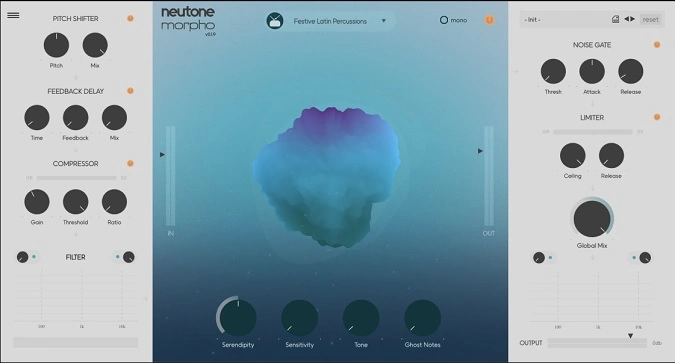
- Dual interaction modes: Macro Mode with four high-level knobs per model and Micro View for direct latent variable manipulation
- Custom model training via Neutone Cocoon: upload your own sounds and generate a personal tone morphing model with no coding required
- Efficient CPU-based inference engine that runs smoothly inside your DAW without a dedicated GPU
- Ethically sourced training data with full transparency and source citations displayed in the model browser
Description
Neutone Morpho is a real-time tone morphing plugin powered by machine learning that transforms any audio input into an entirely different sonic style. Feed it vocals, drums, keys, or synths and the AI resynthesizes the signal through pre-trained models ranging from African djembe percussion to old radio transmissions, all while preserving the rhythmic shape and dynamics of the original performance.
At its core, the Morpho algorithm uses an autoencoder architecture consisting of an encoder and decoder. The encoder analyzes incoming audio and outputs latent variables representing pitch, loudness, and timbral characteristics, while the decoder reconstructs the signal in the style of whatever the model was trained on.
Two interaction modes let you shape the output in real time. Macro Mode provides four high-level knobs per model, including a Serendipity control that dials in randomness for more complex textures.
Micro View exposes the raw latent variables for precise offset and scaling adjustments, giving sound designers granular control over the transformation. This dual-layer approach suits both quick experimentation and deep parameter tweaking.
Version 1.1 introduced custom model training through the Neutone Cocoon service, letting you upload your own audio dataset and receive a personal Morpho model without writing any code. The free edition ships with five models covering strings, percussion, vocals, and textures, while the full version unlocks 32-plus curated models and the ability to train your own.
The plugin runs efficiently on modern CPUs without requiring a dedicated GPU, and has been tested across major DAWs including Ableton Live, Logic Pro, Bitwig Studio, Studio One, Cubase, and Reaper.
Video Preview


Tips
- Experiment with different input sounds to discover unique transformations.
- Utilize the customizable parameters to fine-tune the output to your liking.
- Explore the various pre-loaded models to understand their distinct characteristics.
- Take advantage of the Neutone Cocoon service to create personalized models.
- Regularly check for new models available for purchase to expand your sonic palette.
- Use the plugin in real-time during live performances for dynamic sound transformations.
- Integrate the plugin into your DAW workflow to enhance your music production process.
Frequently Asked Questions
What is the difference between the free and paid versions of Neutone Morpho?
The free version includes five Morpho models and never expires. The full version ($99) unlocks access to 32+ pre-trained models, the ability to purchase additional artist-created models, and access to the Neutone Cocoon custom model training service.
How does Neutone Morpho differ from traditional pitch shifting or vocoder plugins?
Unlike pitch shifters or vocoders that modify existing audio characteristics, Morpho completely resynthesizes the input through a trained neural network. The AI learns the timbral DNA of its training data and applies that character to whatever you feed in, creating genuinely new sounds rather than processed versions of the original.
What kind of audio input works best with Neutone Morpho?
Morpho responds well to dynamic, varied input signals. Percussive hits, vocal phrases, and melodic instrument performances tend to produce the most interesting results. Long sustaining tones may produce noisy output if the loaded model was not trained on similar material, so matching input character to model type yields the best results.
Can I train a custom model with my own sounds?
Yes, with the full license you can train custom models through Neutone Cocoon. You need at least one hour of unique, non-repeating audio. Upload your dataset through the training dashboard, and the model will be available exclusively to you in the plugin's model browser. Each training token costs $29.