
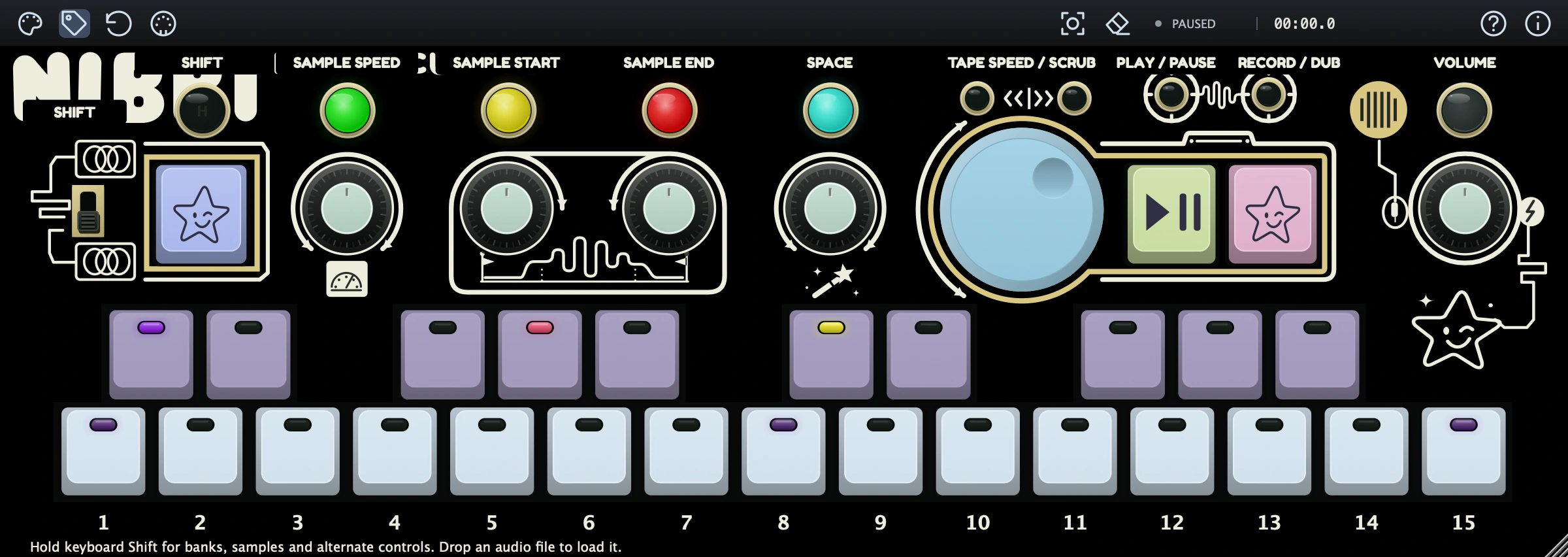
NIBBI
Key Features
- Turns live input or dragged-in audio into a playable seven-voice sampler instrument.
- Provides MELO for chromatic playing and HITKIT for one-shot sample performance.
- Includes five sound banks per mode, plus factory recordings to begin playing immediately.
- Shapes samples with speed, direction, start/end, looping, attack, release, level, and pan controls.
- Combines delay/reverb, drive with tape warble, and filter processing in compact hands-on controls.
- Records, overdubs, varispeeds, and resamples tape-style loops with effects placed before or after the tape.
- Works as AU, VST3, and AAX on macOS, and VST3 and AAX on Windows.
Description
NIBBI is Temecula DSP's seven-voice sampler instrument for quickly recording a sound, playing it from the keyboard, and turning a performance into a tape-style loop. It is designed around immediate capture and transformation rather than deep multisample programming, so an imported file or DAW-routed source can become a playable idea without leaving the plug-in window.
Two performance modes cover chromatic playback and one-shot kits, with five banks for each mode and factory sounds ready to play. Speed, start, and end controls reshape a sample, while the envelope pages and looping options help move it from a short hit toward a sustained texture.
NIBBI's Space, Saturation, and Filter controls add delay/reverb, drive with tape warble, and low-pass/high-pass tone shaping. Effects can be placed before the tape to print changing treatments into an overdub or after it to process the completed loop as a whole.
The tape recorder supports record, overdub, playback, varispeed movement, and resampling back into the sampler. That hands-on approach suits lo-fi sketches, beat experiments, ambient layers, and live sound capture more than detailed conventional instrument-library work.
Temecula DSP provides NIBBI as VST3, AU, and AAX on macOS, and VST3 and AAX on Windows. Its official page includes the installers, illustrated operating guide, and source-code link in one place.
Frequently Asked Questions
What is NIBBI?
NIBBI is Temecula DSP's seven-voice sampler instrument with stereo effects and a tape-style looper. It can record audio, import a file, play a sample melodically, trigger one-shots, and capture a performance onto its internal tape.
Can NIBBI record audio from a DAW?
Yes. The official guide describes recording from a host-routed microphone, auxiliary input, or NIBBI's own output, and it also supports dragging an audio file directly onto the panel.
How do the sampler and tape looper differ?
The sample control captures a sound that can be played from the keyboard or stored in a bank. The separate tape transport records the performance, sets the loop length, and lets you overdub or process the finished loop.
Can effects be recorded into a NIBBI loop?
Yes. NIBBI lets you put its effects before the looper so each overdub prints its current treatment, or after the looper so the complete tape playback is processed together.


