
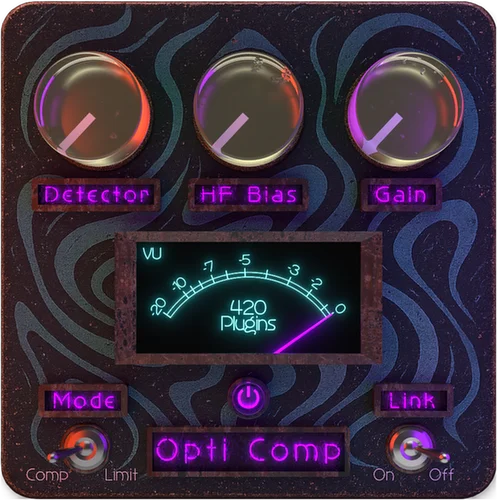
Opti Comp
Key Features
- Program-dependent optical-style compression keeps vocals, bass, and buses controlled without the clampy feel you often get from faster, more aggressive compressor designs
- HF Bias lets you weight the detector toward higher frequencies so low-end energy does not dominate the gain-reduction behavior on bass-heavy material
- Lightweight control philosophy is aimed at fast, mix-ready leveling rather than deep technical tweaking, which suits quick vocal and bus work
- Supports AU, VST3, and AAX formats, making it usable across common macOS and Windows DAW workflows including Logic Pro, Ableton Live, Cubase, Studio One, Reaper, and Pro Tools
- Official positioning keeps it focused on musical smoothing and evenness, making it a better fit for steady control than hard transient shaving or obvious pump effects
- Still offered separately from the paid 420 Plugin Suite, so you can grab Opti Comp without starting the developer's subscription plan
Description
Opti Comp is a free compressor from 420 Plugins built for the kind of smooth, low-drama leveling that works on vocals, bass, buses, and other mix elements that need control without sounding squeezed. The official positioning is firmly in optical, program-dependent territory, so the plugin is less about surgical transient shaping and more about keeping a source even, forward, and musical.
That approach shows up in the way 420 Plugins describes the behavior: Opti Comp adapts its gain reduction to the incoming material instead of forcing a rigid response, which makes it better suited to gentle dynamic control than hard-edged attack-heavy compression. The standout feature is HF Bias, a detector weighting control that shifts more attention toward higher frequencies so low-end energy does not over-trigger the compressor and pull the whole signal down too aggressively.
In practice, that points to a compressor that should be quick to dial in on lead vocals, bass guitars, synth bass, and stereo buses where you want cohesion more than obvious pumping. The wider 420 Plugins lineup is subscription-based, but Opti Comp remains one of the brand's permanently free entry points and is still listed on the official site as a standalone free plugin rather than a trial-only teaser.
The main limitation is distribution. 420 Plugins currently presents the free installers through an email-delivery flow on its homepage instead of a dedicated product page with public platform-specific files, so the plugin is easy to claim but less transparent than mature freeware releases about version numbers, changelogs, and installer sizes.
Frequently Asked Questions
What does the HF Bias control do in Opti Comp?
HF Bias changes how strongly the detector responds to higher frequencies. In practice, it helps stop heavy low-end material from driving the compressor too hard, which can make vocal, bass, or bus compression feel more even across the spectrum.
Is Opti Comp meant for aggressive peak smashing or gentle leveling?
Everything in the official copy points to gentle, program-dependent leveling rather than fast, hard compression. It is positioned for smooth control on vocals, bass, and buses where you want sources to stay consistent without sounding pinched or obviously processed.
Do I need the paid 420 Plugin Suite to use Opti Comp?
No. 420 Plugins still lists Opti Comp separately inside the Free Plugins section, even though it is also included in the paid suite. You do not need an active subscription to claim the free plugin itself.
How do you get the installers right now?
420 Plugins currently routes the freebie through an email-delivery flow on its homepage instead of exposing stable public installer URLs. That makes the plugin simple to claim, but it also means there is no dedicated official product page with platform-specific download files or detailed release notes.


