Orra Key
Key Features
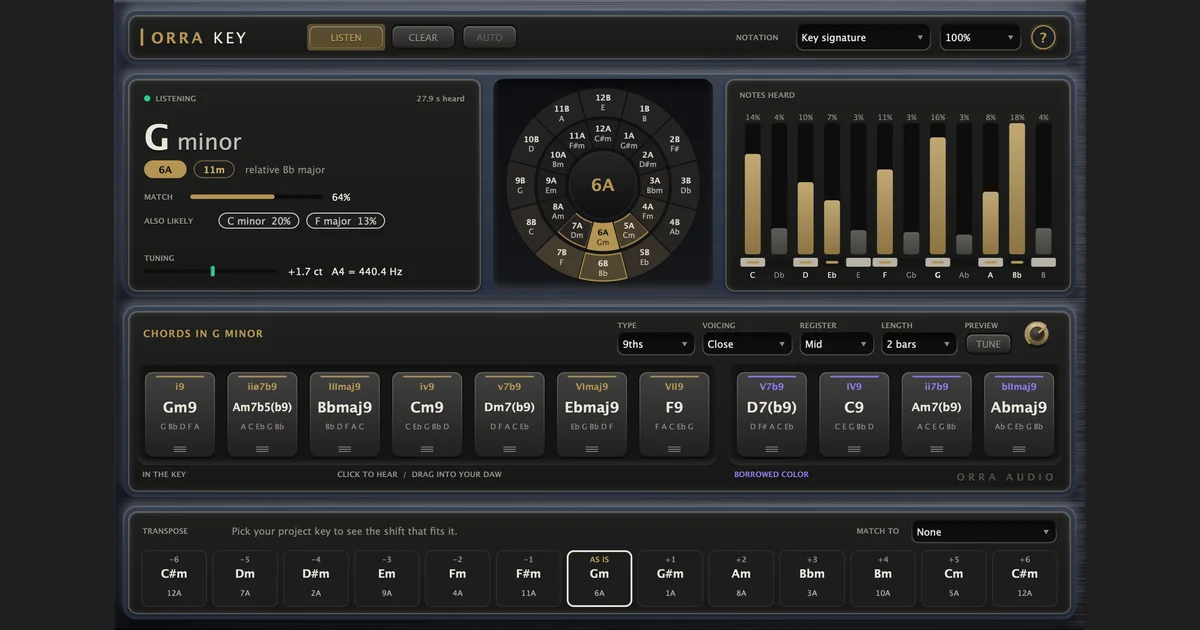
- Detects the key of incoming audio in a few seconds and shows its relative key plus two DJ-code systems.
- Displays a calibrated MATCH percentage and up to two alternate key candidates for context on uncertain material.
- Offers seven in-key chord tiles and four borrowed chords that can be auditioned or dragged into a DAW as MIDI clips.
- Shapes chord output with triads, sevenths, or ninths; four voicings; three registers; and one-, two-, or four-bar clips.
- Shows the notes heard across all twelve pitch classes and provides a clickable wheel for manual key selection.
- Maps transpositions from minus six to plus six semitones and highlights the move that fits a selected project key.
- Reports tuning offset in cents and estimated A4 tuning so detuned samples can be matched more deliberately.
Description
Orra Key is a key-detection audio plug-in from Orra Audio that listens to a sample, loop, track, or mix and reports the detected key, relative key, and two common DJ-key codes. It passes the incoming audio through untouched, so it can sit on the material you want to identify without processing its sound.
Once it has a result, Orra Key turns that answer into a writing aid with seven diatonic chord tiles and four borrowed-chord tiles. You can audition those chords, choose triads, sevenths, or ninths with different voicings and registers, then drag a tile into a DAW as a MIDI clip.
The key wheel, NOTES HEARD display, and MATCH percentage give useful context rather than presenting one unexplained answer. MATCH is calibrated against labeled loops, while ALSO LIKELY offers up to two alternate keys and the manual wheel lets you explore a key even without incoming audio.
For sample-fitting work, the transpose strip displays the result of shifts from minus six to plus six semitones. Selecting a project key with MATCH TO highlights the shift that fits, and the tuning readout shows a sample's offset from A440 in cents.
Orra Key is version 1.0.0 and is available for macOS and Windows in VST3 and AAX formats, with AU on macOS. Orra Audio offers it as a free/pay-what-you-can product; a no-cost license key activates up to three computers.
Frequently Asked Questions
What does Orra Key's MATCH percentage mean?
Orra Audio says MATCH is calibrated against labeled loops and can be read as a hit rate for the detected scale. It counts a key and its relative together because they share the same notes, while ALSO LIKELY can show other fitting keys.
Does Orra Key alter the track it analyzes?
No. The developer says the audio passes through untouched and with no latency; the analysis runs on its own background thread. The only sound the plug-in adds is a short chord preview when you click a chord tile.
Can I use Orra Key when I already know the key?
Yes. You can click a key on the wheel to select it manually, which updates the chord tiles, note display, and transpose strip. This also makes it possible to explore chords without incoming audio.
How does the free license work?
Orra Audio supplies a no-cost license key through its product checkout, with pay-what-you-can optional. One key can activate up to three computers; activation needs an internet connection once, and the manual says activated instances remain usable offline.