
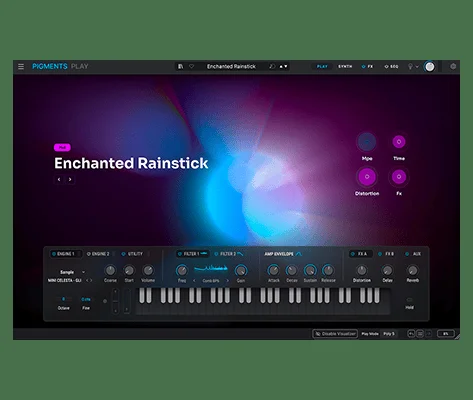
Pigments Play
Key Features
- Includes 100 Pigments-based presets selected for modern basses, pads, keys, leads, sequences, atmospheres, and electronic production styles.
- Uses an audio-reactive Play View that gives visual feedback while you play and adjust sounds.
- Provides four preset-aware macro controls for brightness, timbre, time, and movement instead of exposing the full Pigments edit pages.
- Adds four effect controls covering two modulation effects, delay, and reverb for fast sound shaping.
- Presets can draw on Modal, Granular, Wavetable, Sample, Harmonic, and Virtual Analog synthesis from the Pigments engine.
- Includes access to 68 filter modes and 20 effect algorithms through Arturia's curated preset design.
- Supports automatic Arturia keyboard mapping plus manual MIDI mapping for third-party controllers.
Description
Pigments Play is Arturia's simplified Pigments-powered software synth for producers who want polished modern sounds without opening the full Pigments sound-design environment. It gives you 100 curated presets, an audio-reactive Play View, and a focused set of macro controls for reshaping tone, movement, timing, and effects while staying close to the preset.
The instrument keeps a surprising amount of the Pigments sound engine available behind the scenes. Presets can draw on Modal, Granular, Wavetable, Sample, Harmonic, and Virtual Analog synthesis, with 68 filter modes and 20 effects available through Arturia's curated patch design.
Its limits are clear: you do not get the full modulation system, Main view, FX view, Sequencer view, in-app tutorial, or the 1,700-plus preset library from the paid Pigments version. That makes it better as an immediate songwriting and preset-tweaking instrument than as a blank-canvas synth for detailed patch construction.
For beatmakers, electronic producers, and newer sound designers, the appeal is speed. The browser filters sounds by type and instrument, Arturia keyboard mappings are automatic, and third-party MIDI controllers can be mapped manually, so it can sit in a DAW session as a quick source of basses, pads, keys, leads, sequences, and atmospheric textures.
Frequently Asked Questions
How is Pigments Play different from the full version of Pigments?
Pigments Play uses the same broad synthesis foundation but limits editing to a focused Play View and macro controls. The full Pigments version adds full parameter access, modulation control, Main, FX, and Sequencer views, in-app tutorials, and a much larger preset library.
Can Pigments Play load the same kinds of sounds as Pigments?
Pigments Play includes 100 curated presets powered by Pigments and can use sounds built from the same six synthesis types. It is designed for playing and reshaping curated presets rather than building detailed patches from scratch.
Does Pigments Play require Arturia Software Center?
Yes. Arturia lists Pigments Play as working with Arturia Software Center, which handles installation, activation, and updates for its software instruments.
Is Pigments Play useful if you already own a MIDI controller?
Yes. Arturia keyboard parameters are mapped automatically, and other MIDI controllers can be mapped manually, making it practical for quick preset performance and macro-based control.


