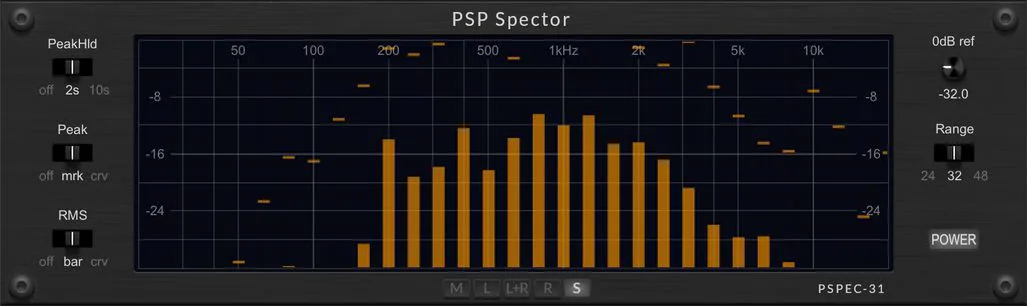
PSP Spector
Key Features
- 31-band spectrum analysis gives a quick visual check of tonal balance across the audible range.
- Peak and RMS measurement modes help separate transient spikes from sustained energy in the same utility.
- Selectable channel display makes it easier to inspect left, right, stereo, or focused channel behavior.
- Adjustable dB range and 0 dB reference level let the meter fit quiet sources, full mixes, and mastering chains.
- Peak hold timing plus line, curve, bar, and RMS display options keep the readout legible for different workflows.
- Built-in high-pass filtering and 15 tutorial factory presets help users learn the analyser and focus on useful frequency zones.
- Resizable interface works in 64-bit AU, AAX, VST, and VST3 hosts on macOS Intel, macOS Silicon, and Windows.
Description
PSP Spector is a 31-band spectrum analyser plugin from PSP AudioWare for checking frequency balance while mixing, mastering, or troubleshooting individual tracks. It gives producers a focused visual readout of peak and RMS energy without changing the sound passing through it.
The plugin started as the PSPEC-31 analyser section inside PSP ConsoleQ and PSP preQursor3 before being released as its own utility. That makes it a practical choice when you want PSP's frequency display available on any channel without loading one of the larger EQ plugins.
Its controls are built around readable metering rather than deep configuration. You can choose the displayed channel, set the dB range and 0 dB reference level, adjust peak hold behavior, switch peak and RMS display styles, use a built-in high-pass filter, and resize the interface for different sessions.
The official PSP page still lists Spector at $0 and says no purchase is necessary, while the launch coverage describes it as a free release for macOS and Windows. Access runs through PSP AudioWare's User Area.
Frequently Asked Questions
Does PSP Spector process the audio signal?
No. PSP Spector is an analysis plugin, so it is meant to display frequency and level information while the audio passes through unchanged. Use it when you want visual confirmation before making EQ, level, or arrangement decisions elsewhere.
How is PSP Spector related to PSP ConsoleQ and PSP preQursor3?
The official page says PSP Spector was originally introduced as PSP Spector PSPEC-31 inside PSP ConsoleQ and PSP preQursor3. This release makes that analyser available as an independent plugin.
What do the peak and RMS display options help with?
Peak views make fast transient spikes easier to spot, while RMS views show more sustained energy. PSP also lets users adjust the peak hold time and switch visual styles, which helps keep the display readable for different material.
Do I need a PSP AudioWare account to download it?
Yes. The official product page says Spector is available at $0 with no purchase necessary, but access is handled through PSP AudioWare's User Area. Users need to log in or create a free account before downloading.