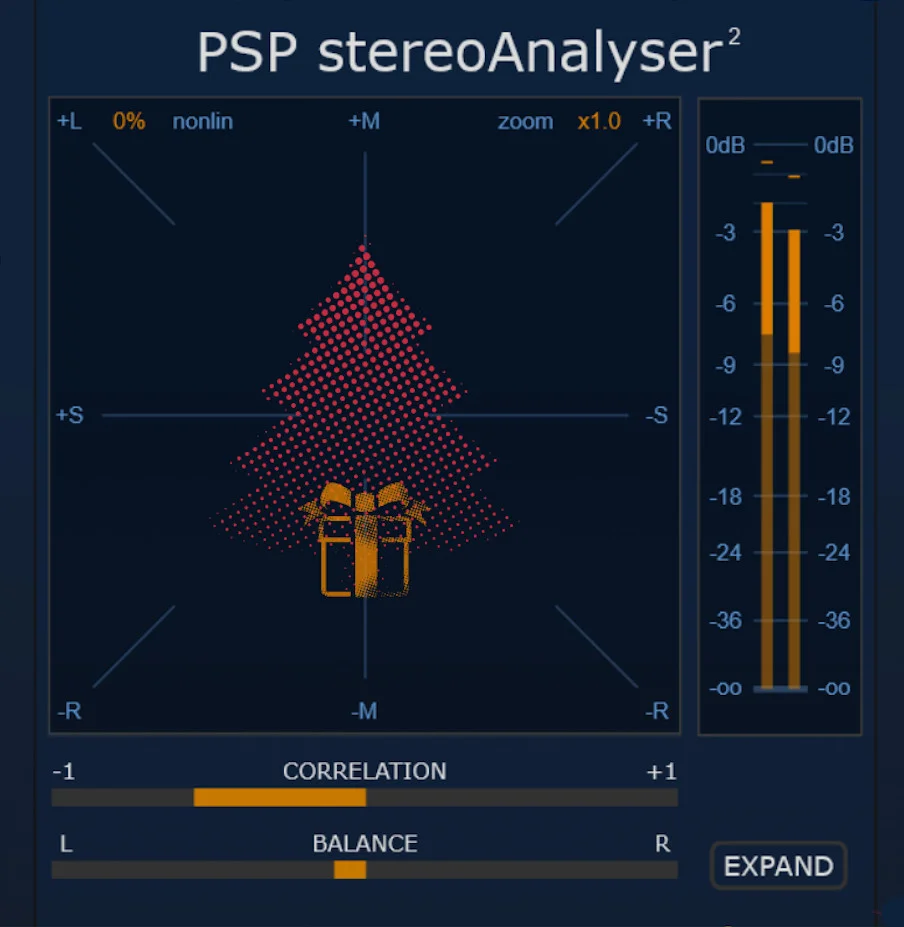
PSP stereoAnalyser2
Key Features
- Real-time X-Y goniometer shows stereo width, polarity, and phase behavior as the signal plays
- Peak and RMS meters provide level context alongside the stereo image instead of requiring a separate utility
- Correlation and balance meters make mono compatibility and left/right energy shifts easy to spot quickly
- Adjustable high-pass and low-pass limits focus the analysis on a specific frequency band when full-range metering is too broad
- Filtered monitoring mode lets you listen to the same frequency range being analyzed for faster troubleshooting
- Zoomable, resizable display with nonlinear shaping keeps the scope readable across compact and detailed layouts
- A/B comparison, undo/redo, preset browsing, 64-bit internal processing, and sample-rate support up to 384 kHz fit professional DAW workflows
Description
PSP stereoAnalyser2 is a stereo metering plugin from PSP AudioWare for checking width, phase, balance, and level structure on dual-channel material. It gives mixers and mastering engineers a focused visual readout of the stereo field without changing the audio passing through it.
The main view centers on a responsive X-Y goniometer, supported by peak and RMS meters, a correlation meter, and left/right balance monitoring. Frequency-limited monitoring lets you narrow the display with adjustable high-pass and low-pass limits, so low-end mono compatibility or upper-range stereo spread can be checked without guessing from a full-band display.
The workflow is deliberately practical: resize the interface, zoom the scope, shape the display response, compare settings with A/B states, and use the filtered monitoring mode when a visual issue needs to be heard directly. PSP also specifies 64-bit internal processing and support for sample rates up to 384 kHz, which makes it suitable as a persistent utility on mix buses, mastering chains, and problem tracks.
The official page lists the plugin at $0 and says no purchase is necessary, while the launch coverage explicitly identifies it as permanently available rather than a limited-time giveaway. Access still runs through PSP AudioWare's User Area, so users should expect to log in or create a free account before downloading the macOS or Windows installers.
Video Preview

Frequently Asked Questions
Does PSP stereoAnalyser2 process or change the sound?
No. PSP stereoAnalyser2 is an analysis and metering utility, so it is designed to show stereo and level information rather than alter the signal. Use it on tracks, buses, or the master output when you need visual feedback while making mix decisions elsewhere.
What does the frequency-limited monitoring feature do?
It lets you restrict the analyzer to a selected frequency range with high-pass and low-pass limits. That is useful when you want to inspect low-end mono stability, check whether wide content is mostly in the highs, or listen only to the band causing a suspicious correlation reading.
Why use this instead of a basic correlation meter?
A simple correlation meter can tell you whether a signal trends toward mono-compatible or out-of-phase behavior, but it does not show the stereo image shape in as much detail. PSP stereoAnalyser2 combines correlation, balance, peak/RMS level metering, and a goniometer in one focused window.
Do I need a PSP AudioWare account to download it?
Yes. The official product page says the plugin is available at $0 with no purchase necessary, but access is handled through PSP AudioWare's User Area. Users need to log in or create a free account before downloading.