
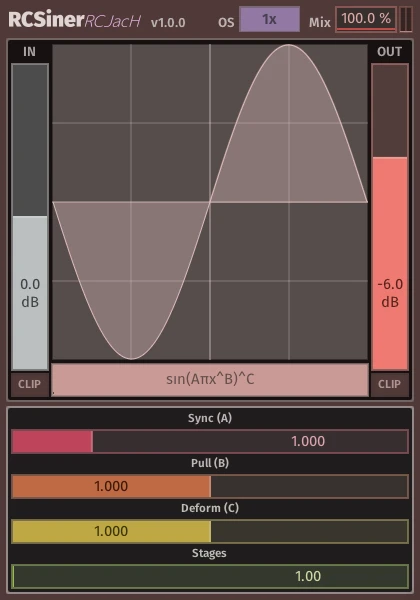
RCSiner
Key Features
- Sine-function waveshaping and phase-distortion algorithms for detailed harmonic shaping
- Sync, Pull, and Deform controls for changing the rate, symmetry, and thickness of the shaping curve
- Interpolated Stages control for pushing the same shaping process through multiple internal passes
- Input and output gain controls with optional clipping before and after the waveshaper
- Oversampling options for reducing aliasing during playback and rendering
- Dry/wet mix control for parallel distortion and subtler saturation blends
- Waveform display for visual feedback while designing distortion curves
Description
RCSiner is a sine-based distortion and phase-distortion plugin for shaping audio with selectable mathematical curves instead of pedal-style drive models. It gives you direct control over input gain, output gain, clipping, wet/dry balance, oversampling, algorithm choice, and a large waveform display that shows how the signal is being transformed.
The core sound ranges from gentle harmonic thickening to aggressive signal destruction. Each algorithm exposes Sync, Pull, and Deform controls, so small parameter moves can change the curve symmetry, density, and movement in ways that feel more like sculpting a transfer function than turning a familiar saturation knob.
The Stages control is the key creative multiplier because it stacks the shaping process internally without needing multiple plugin instances. That makes RCSiner useful for bass design, guitar fuzz, drum mangling, and parallel distortion where you want a precise but experimental tone tool.
RCSiner is open-source and intentionally bare-bones, with the developer warning that it is provided as-is and can produce very loud output when driven past 0 dB. Use the input and output clipping options, start with conservative levels, and treat it as a powerful sound-design processor rather than a polished commercial mix utility.
Frequently Asked Questions
What makes RCSiner different from a typical distortion plugin?
RCSiner is built around selectable sine-based shaping formulas rather than modeled hardware circuits. That makes it better suited to designing unusual harmonic curves and extreme textures than quickly dialing in a familiar tube, tape, or pedal tone.
Can RCSiner be used for subtle saturation?
Yes, but it rewards careful gain staging and small parameter changes. The dry/wet mix, input gain, output gain, and clip controls make it possible to blend lighter harmonic enhancement instead of using it only for heavy destruction.
Why does the developer warn about loud output?
The official README warns that the plugin can create extremely loud signals when the input exceeds 0 dB. Start with low monitoring levels and use the provided output clipping or output gain controls before pushing Stages or drive-heavy settings.
Which build should most users download?
Most DAWs should use the VST3 build for their operating system. CLAP and AU builds are also available from the GitHub release.


