The Room
Key Features
- Positional convolution uses measured room impulse responses rather than an algorithmic reverb engine.
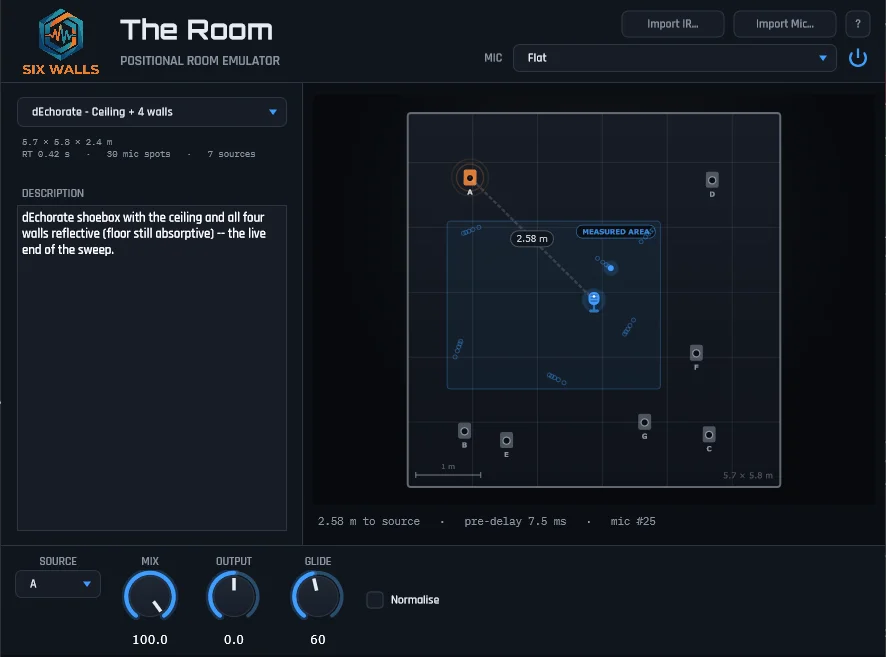
- A draggable microphone changes pre-delay, tone, and level across a top-down room map.
- Equal-power crossfading blends the nearest measured responses as the mic moves.
- Automatable Mic X and Mic Y controls support DAW-driven movement through the room.
- Room banks cover treated spaces, halls, an octagon, a classroom, and variable-reflectivity shoebox measurements.
- Twelve microphone voicings and importable .mic profiles offer different capture perspectives.
- Mix, output, and glide controls shape the wet signal and microphone movement.
Description
The Room is a convolution room emulator from Six Walls that lets you change the sound by moving a microphone through a measured space. Instead of shaping an algorithmic reverb, you drag a mic around a top-down room view while the pre-delay, tone, and level follow its position.
The processor crossfades between the nearest measured impulse responses as the microphone moves. Mic X and Mic Y can be automated from your DAW, making the room position a performance control as well as a way to set a fixed acoustic perspective.
Available room banks include a small treated room, a stone great hall, a domed octagon, a classroom, and a shoebox with changing surface reflectivity. The developer offers different installation sizes and a separate All Rooms add-on, so the room selection depends on the package you choose.
A microphone selector adds the voicing of twelve models, ranging from vintage broadcast dynamics to modern large-diaphragm condensers. You can also import your own .mic profile, including profiles created with Six Walls' Room Mic Capture tool.
The mix, output, and glide controls help balance the effect and adjust microphone movement. Windows and macOS builds, individual installers, room banks, and the full operating manual are available from Six Walls, which also provides the Installer app for installation and updates.
Frequently Asked Questions
Does moving the microphone only change the stereo pan?
No. The Room selects measured impulse responses based on microphone position, so pre-delay, tone, and level change with the position. The nearest measured responses are crossfaded as the mic moves.
Can I automate the microphone position?
Yes. Mic X and Mic Y are automatable, allowing your DAW to move the microphone through the measured room during playback.
Are all measured rooms included in every download?
No. Six Walls offers different installation packages, from a minimal room selection to larger banks, plus a separate All Rooms add-on. Check the individual-download options on the Support page for the package you want.
Can I use my own microphone profile?
Yes. Alongside twelve included microphone models, The Room can import .mic profiles. Six Walls also provides Room Mic Capture for creating a profile.