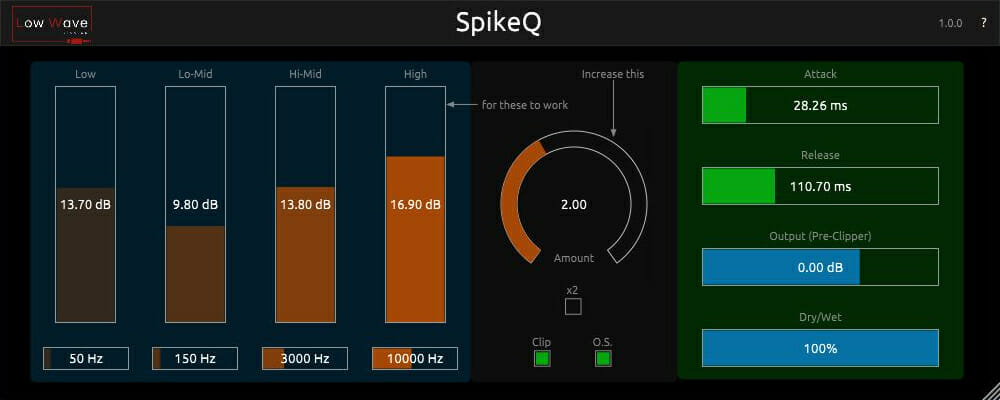
SpikeQ
Key Features
- Four semi-parametric EQ bands (low/high shelves plus two peak bands) applied exclusively to the transient portion of the signal
- Independent attack and sustain processing modes for shaping both the punch and body of a sound separately
- 2x Amount switch for doubling processing intensity on low-dynamic-range sources or for extreme creative effects
- Built-in clipper with optional oversampling to prevent digital clipping and reduce aliasing artifacts
- Adjustable attack and release controls for fine-tuning transient detection sensitivity and recovery time
- Dry/wet mix control for parallel blending between processed and unprocessed signal
- EQ subtract mode allowing you to cut unwanted frequencies from the sustain portion, such as cymbal bleed in drum close mics
Description
SpikeQ by Low Wave Studios is a frequency-based transient shaper that lets you boost specific frequency bands on the attack portion of a sound. Rather than simply increasing the overall transient level like a conventional transient shaper, SpikeQ applies EQ processing exclusively to the attack, giving you surgical control over which frequencies punch through a mix.
The plugin features four semi-parametric EQ bands consisting of low and high shelves plus two peak bands. This lets you add significant low-end punch to a kick drum's transient without making the sustain boomy, or add high-frequency click to a snare without making the tail splashy.
A 2x Amount switch doubles the processing intensity for sources with low dynamic range or when more extreme effects are desired. The built-in clipper with optional oversampling catches any peaks that exceed safe levels, preventing digital clipping while keeping aliasing artifacts at bay.
Version 1.1.0 added the ability to process sustain as well as attack, along with a subtract mode for the EQ bands. This means you can now reduce unwanted frequencies in the sustain portion, such as taming cymbal bleed in close drum mics while preserving the attack character.
SpikeQ is built with the JUCE framework and runs efficiently even with oversampling enabled. It is available as a 64-bit VST3 and AU plugin for Windows and macOS (Intel only, no ARM/Apple Silicon support).
Video Preview

Frequently Asked Questions
Can SpikeQ process the sustain portion of a sound or only the attack?
Since version 1.1.0, SpikeQ can process both attack and sustain independently. You can switch between adding EQ-shaped attack or sustain to your signal, and the subtract mode lets you cut frequencies from the sustain, which is useful for reducing cymbal bleed in drum recordings.
What does the clipper section do and should I leave oversampling enabled?
The clipper catches audio peaks that exceed safe levels after heavy transient boosting, preventing digital clipping in your DAW. Oversampling processes the clipper at a higher sample rate to avoid aliasing artifacts. The CPU impact of oversampling is minimal, so leaving it on is generally recommended.
Does SpikeQ work on Apple Silicon Macs?
No. The developer states that all Low Wave Studios plugins are available for Windows and macOS but do not support ARM-based M-series Apple Silicon processors. You would need to run it under Rosetta 2 translation on an M1 or later Mac.
Is SpikeQ only useful on drums or can it be used on other sources?
While drums are the most common use case, SpikeQ works on any source where you want specific frequencies to pop in the attack. Users have found it effective on bass guitars, acoustic guitars, percussion loops, and even vocals where you want certain consonants to cut through a dense mix.