TagoClip
Key Features
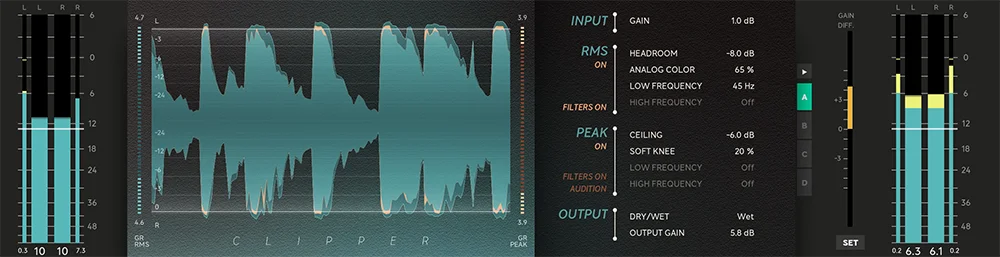
- Recreates the measured Fruity Soft Clipper-style transfer curve in FL mode for familiar 808 and drum clipping outside FL Studio.
- Offers hard and tanh curves alongside the FL-style curve for cleaner or more forceful peak shaping choices.
- Provides Off, 4x, and 8x oversampling modes so you can balance original-style texture against reduced aliasing.
- Uses Delta listening to audition only the audio removed by clipping before committing to more drive.
- Includes a mono-low section that can keep sub information centered before it reaches the clipper.
- Adds Mix and numeric gain-reduction feedback for parallel clipping and clearer level decisions.
- Supplies signed and notarized AU/VST3 support on macOS plus VST3 support on Windows through the developer's delivery flow.
Description
TagoClip is a soft clipper for driving 808s and drums into the familiar Fruity Soft Clipper-style curve without staying inside FL Studio. It reproduces that measured curve in FL mode, then adds hard and tanh alternatives when a track needs a different clipping character.
Its 4x and 8x oversampling modes give producers a way to reduce the aliasing introduced by clipping, while Off preserves the original-style behavior. Delta listening makes the trade-off audible by monitoring only the material removed by the clipper instead of asking you to judge peak reduction blindly.
A mono-low section can sum bass below a chosen frequency before clipping, helping a wide source keep its sub information centered. The compact signal path is aimed at fast 808 and drum-bus decisions: set the knee and drive, compare oversampling modes, and use the mix control to retain some dry transient detail.
TagoBeats distributes version 1.1.1 through an email form on the official product page. The macOS installer is signed and notarized for AU/VST3 hosts, while Windows is provided as VST3; that external page remains the source for current delivery and platform selection.
Frequently Asked Questions
Is TagoClip affiliated with FL Studio or Image-Line?
No. TagoBeats describes TagoClip as an independent product and says it is not affiliated with or endorsed by Image-Line. Its FL mode is a measured recreation of the Fruity Soft Clipper transfer curve, not an Image-Line release.
What does oversampling change in TagoClip?
The developer offers Off, 4x, and 8x oversampling modes. The higher modes are intended to reduce clipping-induced aliasing, while Off retains the original-style behavior for users who want that texture.
What is Delta listening used for?
Delta listening monitors the portion of the signal that the clipper removes. It is useful for judging whether extra drive is producing a helpful density change or taking too much transient and high-frequency detail away.
What does the mono-low control do?
It sums audio below a selected frequency to mono before clipping. That can help keep the sub region centered when working with wide bass or drum material.
How do I get TagoClip?
Open the official TagoClip page, choose Download Free, and submit an email address to receive the developer's link. That page is the current official delivery route for the macOS and Windows builds.