Textures
Key Features
- 75 texture presets spanning six categories: Foley, Mechanical, Nature, Soundscape, Tape, and Vinyl
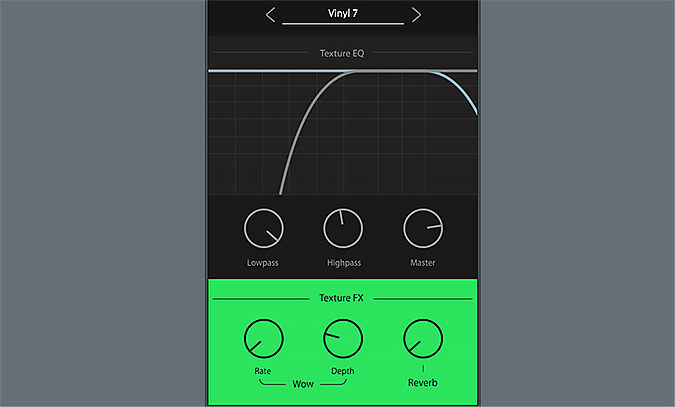
- Independent high-pass and low-pass EQ panel that filters only the texture layer, preserving your original audio
- WOW flutter effect replicating the pitch drift and speed wobble of vintage turntables and tape machines
- Built-in reverb module for pushing textures into a more diffused, ambient space
- Drag-and-drop workflow that instantly layers noise, crackle, and environmental ambience over any track
- Source audio remains completely unprocessed, with all effects applied exclusively to the selected texture
Description
Textures by Clark Audio is a lo-fi overlay effect plugin that layers ambient noise, vinyl crackle, tape hiss, and environmental soundscapes directly onto your audio. Originally priced at $39, the plugin is now available at no cost and ships with 75 curated texture presets across six categories: Foley, Mechanical, Nature, Soundscape, Tape, and Vinyl.
The built-in high-pass and low-pass EQ panel filters the texture layer independently, leaving your source audio untouched. This means you can sculpt exactly how much crackle or ambience sits in the mix without affecting the underlying signal.
A dedicated WOW flutter effect emulates the pitch and speed inconsistencies of vintage turntables and tape machines, adding organic drift to the texture layer. The reverb module pushes textures further back in the stereo field for a more diffused, atmospheric blend.
Producers working on lo-fi hip-hop and chillhop reach for Textures when they want instant vinyl character or tape warmth layered over their beats. The nature and soundscape presets also make it a practical tool for film scorers and media composers who need quick environmental ambience without loading a separate sample library.
Textures runs as a 64-bit VST3 and AU plugin on macOS and Windows, and works in all major DAWs except Pro Tools. Note that the plugin has not received updates since 2021, though it is designed to function on more recent operating systems.
Video Preview


Frequently Asked Questions
Does Textures process or alter my original audio signal?
No. Textures overlays a separate noise or ambience layer on top of your audio. The built-in EQ and effects only affect the texture layer itself, so your source signal passes through completely unprocessed.
Is Textures compatible with Pro Tools?
Textures does not support AAX format, so it will not load in Pro Tools. It works as a VST3 or AU plugin in all other major DAWs including Ableton Live, FL Studio, Logic Pro, Reaper, and Studio One.
Has Textures been updated for current operating systems?
The plugin has not received updates since 2021. Clark Audio notes it is designed to function on more recent operating systems, but there is a possibility of encountering errors on the latest macOS or Windows versions.
What kinds of textures are included beyond vinyl crackle?
Beyond vinyl crackle, the 75 presets include mechanical noise (motors, gears, static), tape hiss variations, foley recordings, nature environments (rain, wind, forest), and broader soundscapes. The nature and soundscape categories are particularly useful for ambient music and film scoring.