TugSpect
Key Features
- Image-to-spectral filter that converts pixel brightness into frequency-specific volume shaping via real-time FFT processing
- Built-in drawing tools for creating ellipses, rectangles, and lines directly inside the plugin without external image editors
- Greyscale-to-volume mapping produces smoother, more dynamic filtering compared to binary on/off spectral gates
- Full image manipulation with rotation, zoom, contrast adjustment, and repositioning — all automatable within your DAW
- Three visualization modes for monitoring spectral activity in real time
- SmVer and SmHor smoothing functions for controlling vertical and horizontal spectral transitions
- DAW clock synchronization with adjustable playback direction, attack, and decay envelope controls
Description
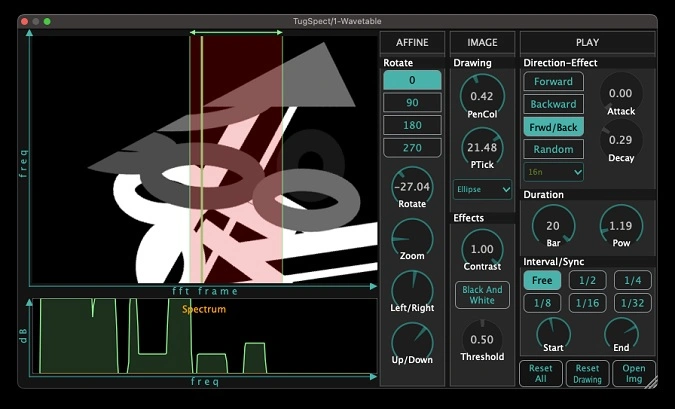
TugSpect by Tugrulakyuz turns images into real-time spectral filters. Load any photograph, abstract artwork, or hand-drawn shape, and the plugin scans its pixel values to dynamically shape incoming audio through Fast Fourier Transform processing.
The y-axis maps to the frequency spectrum, so a diagonal line sweeps the filter across frequencies while its thickness controls sharpness. Brightness translates to volume rather than a simple on/off gate, letting frequencies fade in and out for more nuanced, dynamic results.
Beyond static image loading, TugSpect includes a built-in drawing canvas for sketching ellipses, rectangles, and freeform lines directly inside the plugin. Rotate, zoom, and adjust contrast without leaving your DAW, and automate those parameters for evolving spectral movement synced to your session clock.
Three visualization modes let you monitor the spectral processing in real time, while SmVer and SmHor smoothing controls tame harsh transitions between frequency bands. An adjustable shift knob repositions the spectral window without altering the filter's interval structure.
TugSpect operates only during DAW playback, making it an interactive performance tool rather than a static processor. It runs as a VST3 and AU plugin on macOS (Intel and Apple Silicon) and Windows.
Video Preview


Tips
- Experiment with different types of images to discover unique spectral effects.
- Use the SmVer and SmHor functions to smooth the image and create subtle variations in the sound.
- Synchronize the plugin with your DAW clock to ensure the effects blend rhythmically with your track.
- Adjust the playback direction and use the attack and decay controls to shape the overall sound.
- Utilize the shift knob to explore different spectral ranges without altering the interval.
- Try drawing basic shapes to isolate specific frequency ranges and create static or dynamic filtering effects.
- Rotate and zoom the image to focus on particular areas and achieve desired sound transformations.
Frequently Asked Questions
How does TugSpect differ from other spectral filter plugins?
TugSpect translates image brightness into volume levels on a per-frequency basis, producing smoother spectral filtering than binary on/off approaches. You can import any image file or draw shapes directly in the plugin, and the y-axis maps to frequency so visual positioning directly controls which frequencies are affected.
Can I use TugSpect for wavetable creation?
Yes, several producers use TugSpect to generate unique wavetables by processing simple waveforms through image-based spectral filtering. The results can be resampled and loaded into wavetable synthesizers for original sound design starting points.
Why does TugSpect only work when the DAW is playing?
TugSpect is designed as a real-time performance tool that scans the loaded image in sync with your DAW's transport. It needs the playback clock to determine which portion of the image is being read at any given moment, so it activates only during playback.
Do image controls reset when loading a new image?
Currently, rotation, zoom, and position settings reset when you import a new image. You can work around this by adjusting the controls after loading and saving the plugin state as a preset to preserve your settings.