Flite
Key Features
- Hybrid instrument design combines four multi-samplers with FM, granular, virtual analog, and wavetable synthesis in one plugin.
- Bundled 2.5GB-plus library covers vintage synths, drum machines, foley, FX, loops, keys, basses, chords, and other multi-genre source material.
- More than 200 presets by Sharooz Raoofi, Wavetick, Principleasure, and other designers make it fast to audition finished sounds.
- Eight macro controls per preset give Play users immediate shaping access without exposing the full editor.
- Dual 12/24dB multimode filters, LFOs, envelopes, modulation routing, step sequencing, EQ, and multi-effects provide deeper movement in Create mode.
- VST3 and AU installers cover modern macOS and Windows DAW workflows from a single Wavea account download.
Description
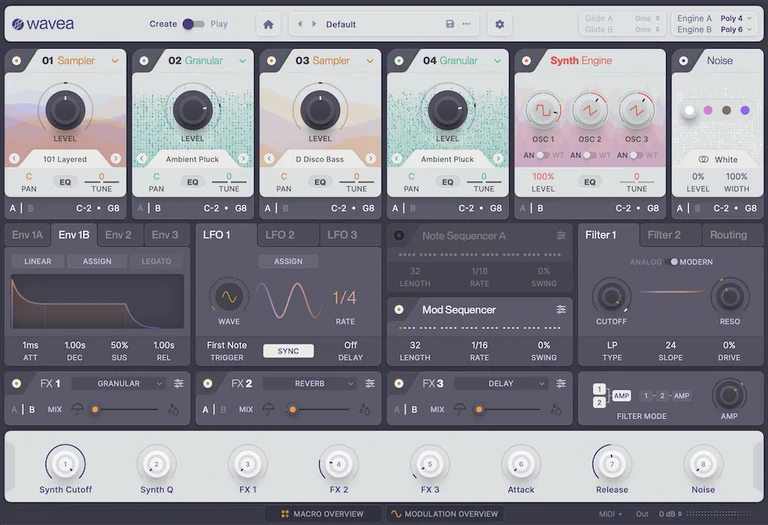
Flite is a hybrid sampler and synth plugin from Wavea that gives macOS and Windows producers a preset-first version of a deeper sound-design instrument. The Play tier focuses on a 2.5GB-plus library of vintage synth and drum-machine samples, with more than 200 patches and macro controls for quick shaping.
The official page frames the engine around four multi-samplers, granular oscillators, FM, virtual analog, and wavetable synthesis, dual filters, step sequencing, modulation, and onboard effects. In Play mode, those deeper editor functions are deliberately limited, while Create unlocks sample import, preset saving, parameter editing, monolith export, and custom instrument building.
That makes Flite most useful as an instant source of polished analog-derived keys, pads, basses, loops, drums, and textures rather than as an open-ended sampler replacement in its default state. Review coverage consistently points to the sound library and interface as the appeal, with the main caveat being that full preset search, deep editing, and saving live behind the paid Create tier.
As checked on April 29, 2026, Wavea still labels Flite Play as free to download and says it gives trial access to the Create editor, with no countdown or coupon wording attached to the Player.
Video Preview

Frequently Asked Questions
Is Flite Play the same as Flite Create?
No. Flite Play gives access to the preset library and macro controls, while Flite Create unlocks deeper parameter editing, preset saving, sample import, monolith export, and full custom instrument building.
Can you import your own samples in the Player tier?
The official page says sample import belongs to Flite Create, and the Player gives trial access to the Create editor. If custom multisample building is the goal, treat the Player as a preset library and the paid Create tier as the full editor.
What kind of sounds are included?
Wavea lists samples from instruments such as Yamaha CS-80, Juno 106, Jupiter 8, TB-303, TR-808, TR-909, SH-101, Oberheim OB-8, Prophet 5, Korg Monopoly, Linn Drum, foley, and FX sources. The presets cover broad multi-genre synth, sampler, drum, loop, and texture material.
Does the download require an account?
Yes. The current Wavea download and purchase buttons route through the Wavea login flow, so users need an account before they can claim the installer.