
XF Comp
Key Features
- Analyzes imported WAV and FLAC audio to suggest starting compression settings.
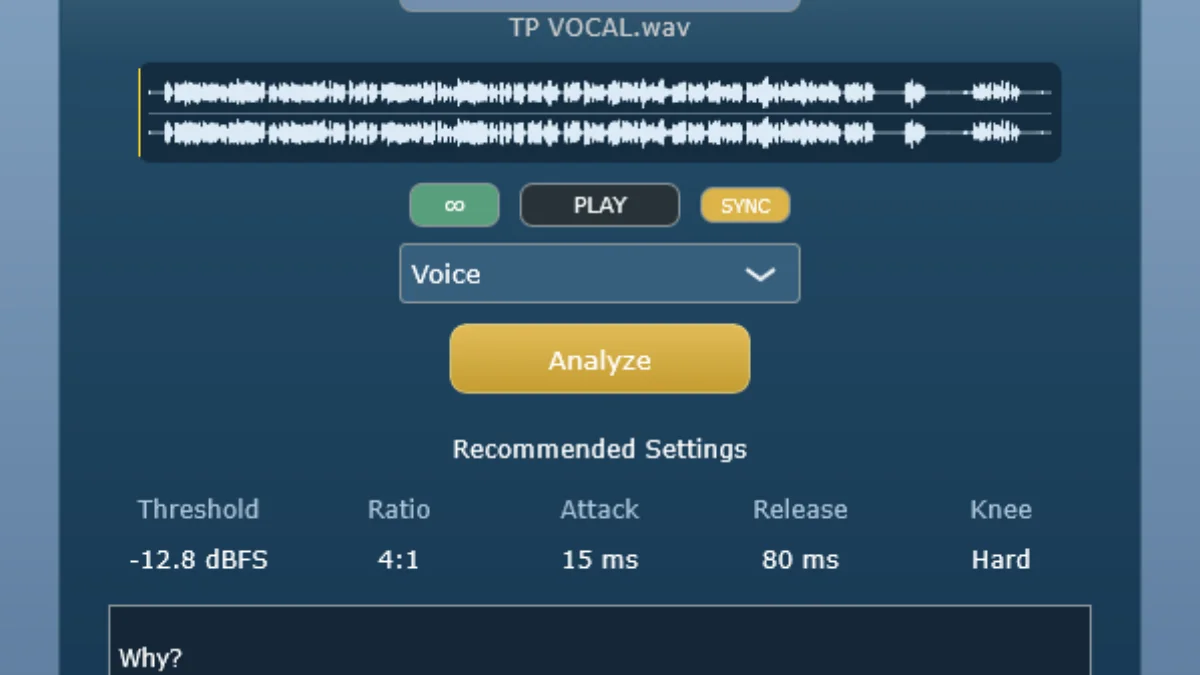
- Recommends threshold, ratio, attack, release, and knee values for the selected material.
- Offers Voice, Drums, Bass, and Synth source choices to frame the analysis.
- Explains the reasoning behind each recommendation and includes a practical source-specific tip.
- Displays peak, RMS, crest factor, dynamic range, transient, compression-state, and clipping metrics.
- Runs as a 64-bit Windows VST3 assistant, letting you move the suggested values into another compressor.
Description
XF Comp is a Windows VST3 compression assistant from Sintelab that analyzes an imported WAV or FLAC file and recommends starting values for threshold, ratio, attack, release, and knee. It is a guide for setting up a compressor rather than a processor that applies compression to the audio itself, so you can transfer its suggestions to the plug-in you normally use.
After loading a file, choose Voice, Drums, Bass, or Synth and run the analysis. XF Comp pairs its suggested values with an explanation of the recommendation and a source-specific practical tip, which makes the result more useful as a learning aid than a bare preset.
The interface also reports peak level, RMS, crest factor, dynamic range, transients, compression state, and clipping. Those readings provide a quick snapshot of the material before you decide whether to use gentler leveling, stronger peak control, or a different compression approach.
XF Comp is aimed at Windows producers who want a concrete first pass when standard compressor controls feel abstract. Because the recommendations are starting points, it is best used with listening and adjustment in the context of the mix rather than as an automatic final decision.
Frequently Asked Questions
Does XF Comp apply compression to my audio?
No. XF Comp analyzes an imported audio file and recommends starting values, then you apply those settings in the compressor you choose. It is designed as an assistant for the decision-making stage rather than as the compressor itself.
Which compressor controls can XF Comp recommend?
XF Comp suggests threshold, ratio, attack, release, and knee settings. It also shows why the values were selected and gives a practical tip for the source category.
What audio sources can I analyze in XF Comp?
The assistant provides Voice, Drums, Bass, and Synth source choices. You load or drag in a WAV or FLAC file, select the appropriate source, and run the analysis.
What does XF Comp show besides suggested settings?
The signal-metrics view includes Peak, RMS, Crest Factor, Dynamic Range, Transients, Compression State, and Clipping. These readings can help you understand the dynamic behavior behind the recommendation.


