
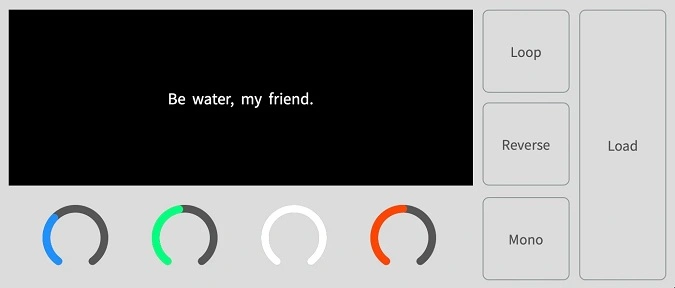
AASamplePlayer (GAS Therapy)
Key Features
- Turns sound files into playable instruments
- Start point, attack, release, and pitch controls
- Load, loop, reverse, and mono/poly functions
- Batch loading and keyboard sample navigation
- Automation and DAW preset management support
- No sample-file duplication or peak-file creation
- VST3 desktop support, with AU on macOS
Description
AASamplePlayer is GAS Therapy’s efficient file sampler for turning sound files into playable instruments. The documented controls include start point, attack, release, and pitch, plus load, loop, reverse, mono/poly, and file-navigation functions; it supports automation and DAW preset management without duplicating sample files.
The desktop plug-in is listed as VST3 for Windows and VST3/AU for macOS, with standard MIDI-device use. The product also has standalone and AUv3 support on compatible Apple devices, while video-file loading is identified for the Mac and iOS versions.
Tips
- Use the batch load feature to quickly switch between multiple samples without duplicating files.
- Utilize the loop function to create seamless loops for your samples.
- Experiment with the reverse button to add unique textures to your sounds.
- Adjust the start point and pitch knobs to fine-tune the playback of your samples.
- Use the mono/poly mode to switch between monophonic and polyphonic playback, depending on your needs.
- Take advantage of the automation support to create dynamic changes in your samples over time.
Frequently Asked Questions
What controls are available?
AASamplePlayer lists four main knobs for start point, attack, release, and pitch. It also provides loading, looping, reversing, mono/poly, and file-navigation controls.
Does it duplicate loaded samples?
The product information says it handles sample files without duplicating them or creating peak files.
Which desktop formats are available?
The listing identifies Windows VST3 and macOS VST3/AU versions. Video-file loading is identified for the Mac and iOS versions.


