AI Chords
Key Features
- Prompt-based chord progression generator for turning mood and style text into MIDI ideas
- Key and chord-count controls for generating 4-, 6-, or 8-chord progressions
- Drag-and-drop MIDI export for moving generated progressions into a DAW arrangement
- Chord replacement, simplification, and complexity controls for refining the generated harmony
- Humanization controls including velocity range and spread for less rigid playback
- Start and end-position editing for adjusting where the progression falls across the bars
Description
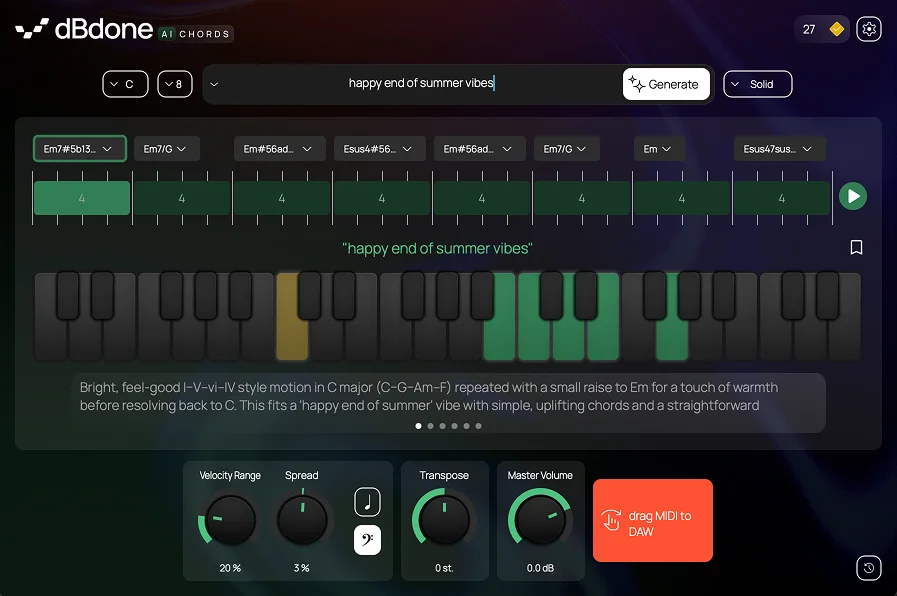
AI Chords is a MIDI-generating composition plugin from dBdone that turns a written prompt into chord progressions for songwriting, beatmaking, and quick demo building. You choose a key, set the number of chords, describe the mood or style you want, then drag the generated MIDI into your DAW.
The workflow is intentionally direct: generate a progression, then reshape it with musical controls instead of editing every note from scratch. dBdone lists tools for replacing, simplifying, or complexifying chords, plus humanization controls for velocity range and spread.
That makes AI Chords useful when you need harmonic starting points more than a full arrangement engine. It is especially relevant for producers who write from prompts, want fast lo-fi or pop sketch ideas, or need a way to audition chord movement before committing to a part.
The official page is still live and still advertises a free download, while the original release coverage documents a free tier with 10 monthly credits alongside paid credit plans. Download access routes through dBdone's account/shop system.
Frequently Asked Questions
How does AI Chords generate progressions?
The official page describes a workflow where you choose a key, choose the number of chords, select the AI model, and write a prompt for the style or mood you want. The plugin then generates a chord progression that can be edited and exported as MIDI.
Can AI Chords export MIDI to another instrument?
Yes. Both the official page and release coverage describe dragging the generated MIDI into your project, so the plugin is meant to feed your own DAW instruments rather than lock you into a built-in sound.
What are the limits of the free tier?
The original release coverage documents a free tier with up to 10 credits per month, plus paid monthly credit tiers and a one-time purchase option. The official product page still advertises a free download, but download access is routed through the dBdone account system.